
Policy Hub documentation
Everything you need to install, set up and run your insurance agency: policies and renewals, claims, leads and quotes, KYC, the customer portal, your own website, the Android and iPhone apps, and the AI tools.
Overview
Policy Hub is a complete insurance agency management system. Run it for your own agency, or as a SaaS: agencies sign up, pick a plan and manage everything in one place, with their data kept completely separate.
How the pieces fit together
| Part | What it is | Who uses it |
|---|---|---|
| Admin panel | The back office: customers, policies, claims, renewals, leads, quotes, payments, reports and settings. | Super admin, agency owner, agents and staff |
| Customer portal | The same login with a customer's own view: policies, payments, claims, documents, requests and notifications. | Customers |
| Agency website | A public website for each agency with plans, a quote form, online sign-up and the Get our app page. Works on /site/your-name or your own domain. | Visitors and customers |
| Mobile apps | Flutter apps for Android and iPhone, one app serving every agency; customers find their agency by search, code or QR. | Customers |
| API | A read-only REST API for an agency's own tools, and a customer API that powers the apps. | Developers |
Quick-start checklist
- InstallCheck the requirements, create the database, upload the files and run the installer.
- Log in and secure the accountsUse the default logins once, then change every password.
- Switch on the background workAdd the cron line so renewal reminders, overdue flags and app reminders run.
- Email and company detailsIn Settings fill in the company and email (SMTP) tabs. See Settings.
- Describe what you sellAdd policy types, sub types, durations, document types, taxes and your policies. See Setting up your business.
- Add people and policiesAdd agents and customers, or switch on online sign-up on the website, then issue policies.
Server requirements
Policy Hub is built with Laravel. Make sure your hosting meets the following before you start.
- PHP
- 8.1 or newer (8.2 is recommended)
- Database
- MySQL 5.7+ or MariaDB 10.3+
- Web server
- Apache (with
mod_rewrite) or Nginx - HTTPS
- Strongly recommended. Required for the mobile apps, online payments and push notifications.
- Cron
- One cron line, see Background work
Required PHP extensions
Folders that must be writable
storage, bootstrap/cache and the upload folders. The installer checks these too. For a live server, lock everything else down.
Create the database
The steps below use cPanel. Other hosting panels offer the same options under similar names.
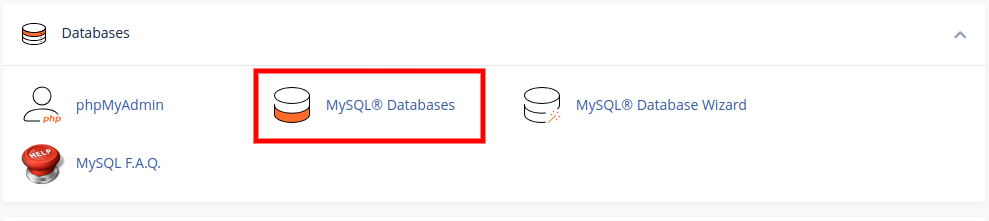
- Open the database toolIn your hosting panel go to Databases and click MySQL® Databases. This tool creates databases and database users.
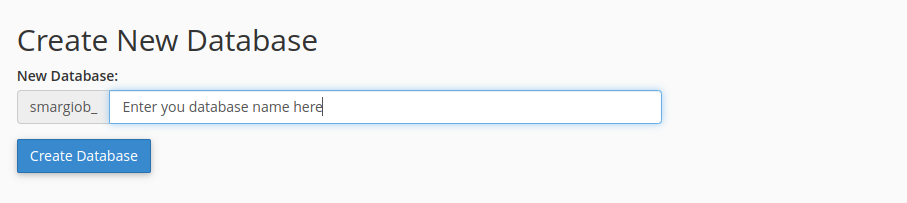
- Create the databaseType a name and click Create Database. Your host adds a prefix to the name; write the full name down.
- Create a userFurther down, under Add New User, type a user name and a strong password (use the password generator) and click Create User.
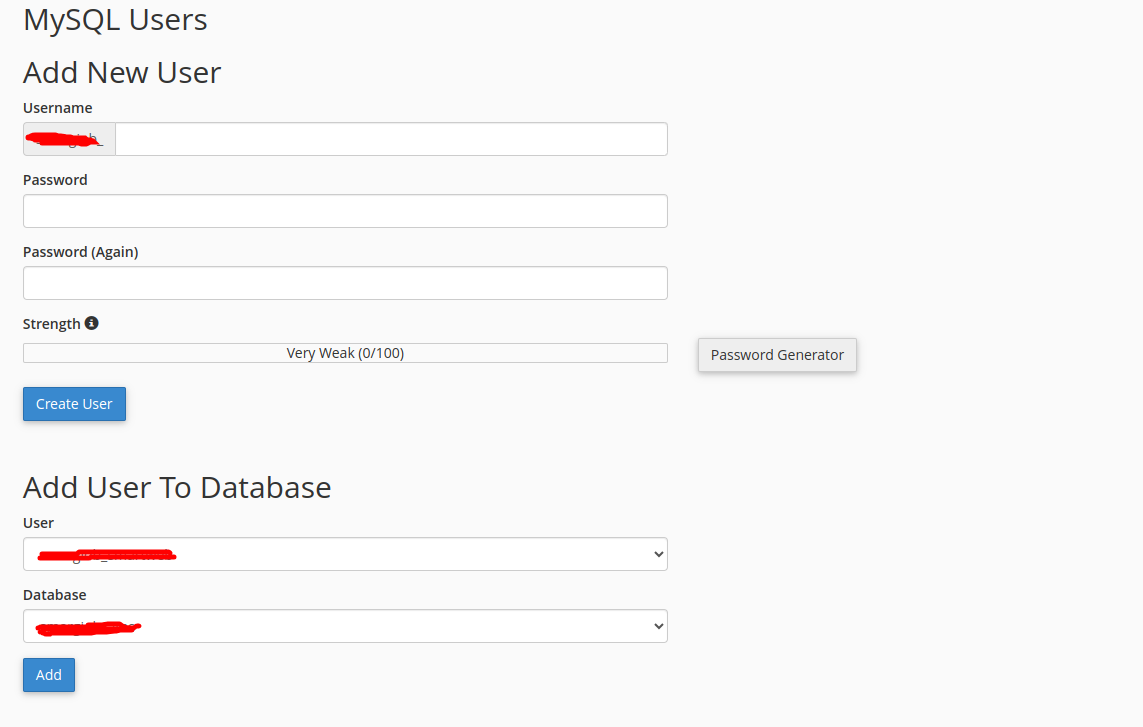
- Add the user to the databaseUnder Add User To Database choose the user and the database and click Add.
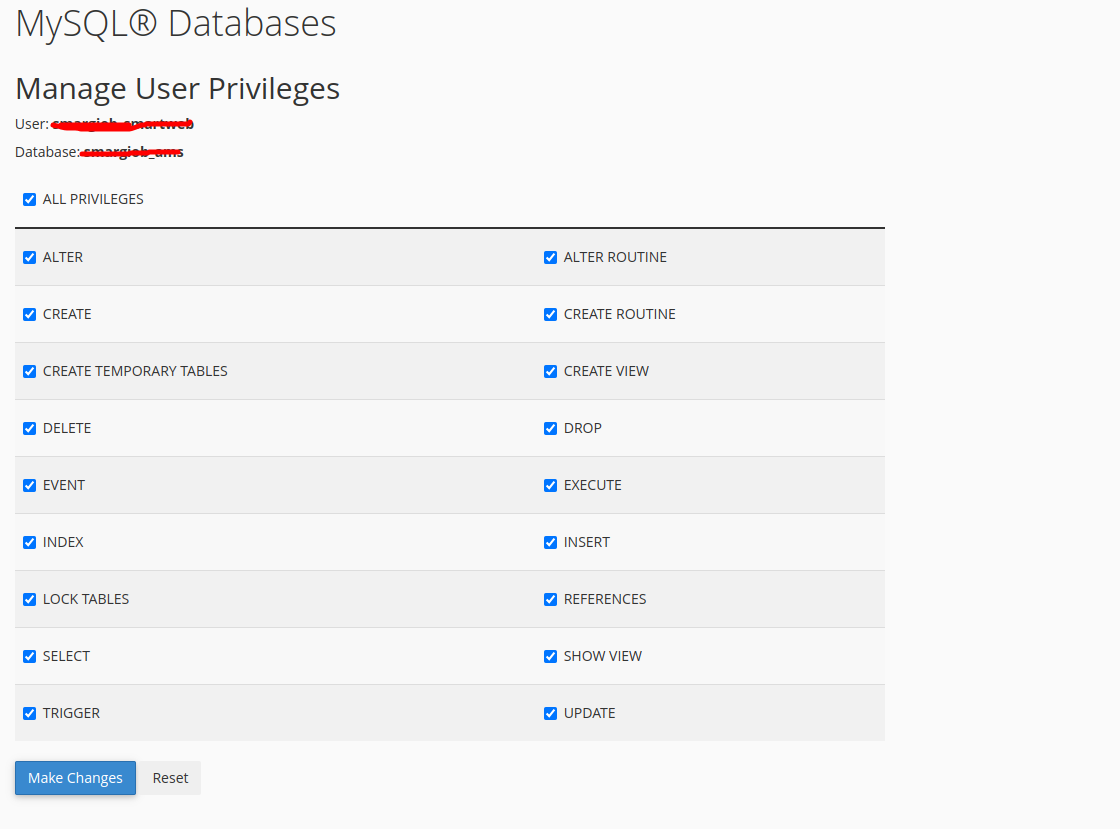
- Give all privilegesTick ALL PRIVILEGES and click Make Changes. The database is ready.
localhost), database name, user name and password. The installer asks for them.Upload the files
Upload the contents of the main_file folder to your web root.
- Open the File ManagerIn cPanel open Files → File Manager.
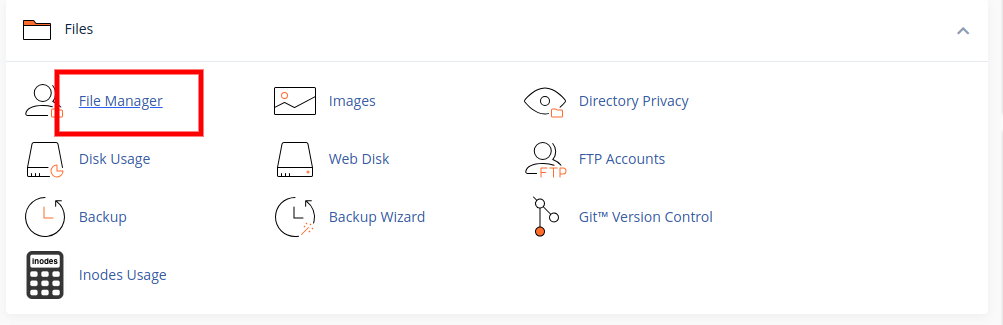
- Go to the web rootFor your main domain this is usually
public_html. For a subdomain or a folder, open that folder instead.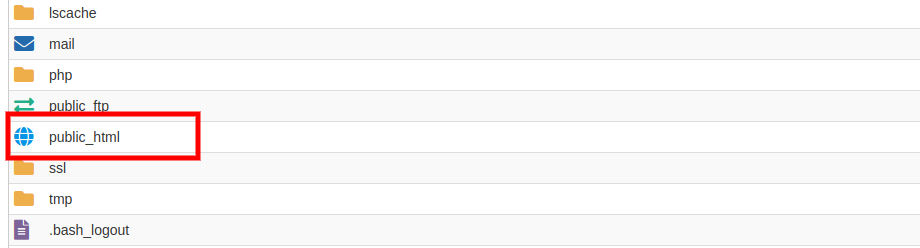
- Upload and extractClick Upload, add the zip of
main_file, wait for 100% and then Extract it so its contents sit directly in the web root. - Check the resultYou should see
app,bootstrap,public,routes,vendor,index.phpand a hidden.htaccess.
documentation or mobile_app folders to the web root. They are for you to read and to build the phone apps on your own computer.Run the installer
Open https://yourdomain.com/install in a browser and follow the six steps.
- StartThe App Installation Process page opens.
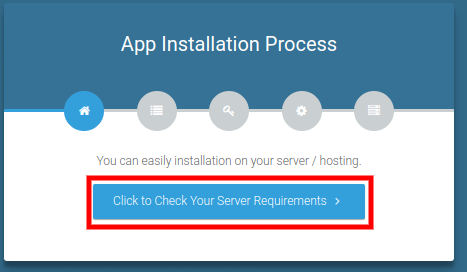
- Check the serverClick Click to Check Your Server Requirements. Every extension should show a green tick.
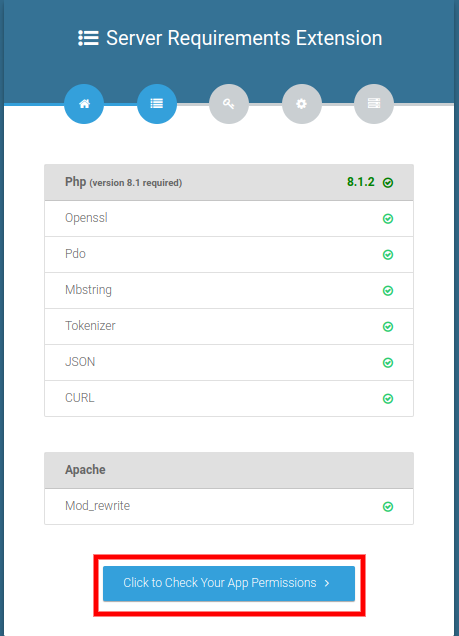
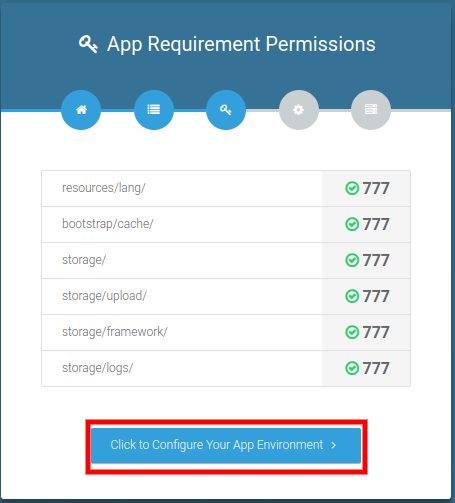
- Check permissionsFolder permissions are checked next. Then click Click to Configure Your App Environment.
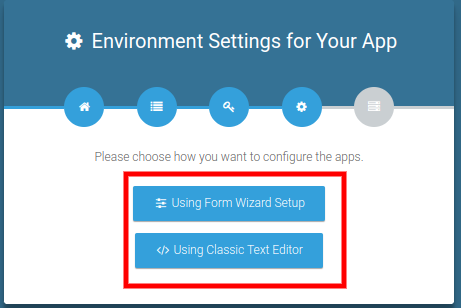
- Choose the setupSelect Using Form Wizard Setup.
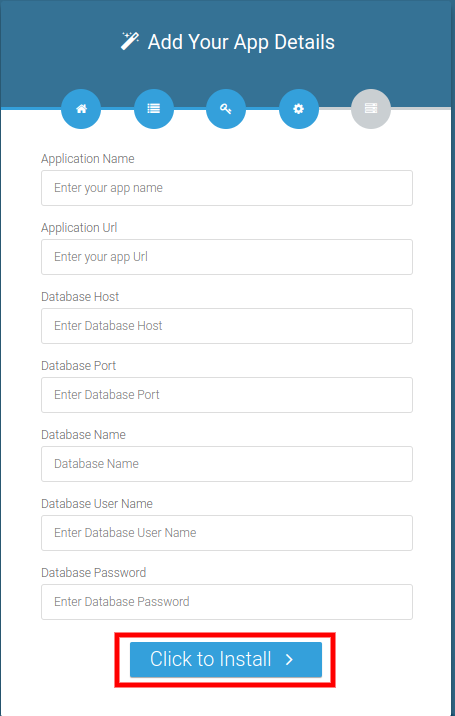
- Enter the detailsFill in the application name and URL and the database host, name, user and password from the database step, then click Click to Install.
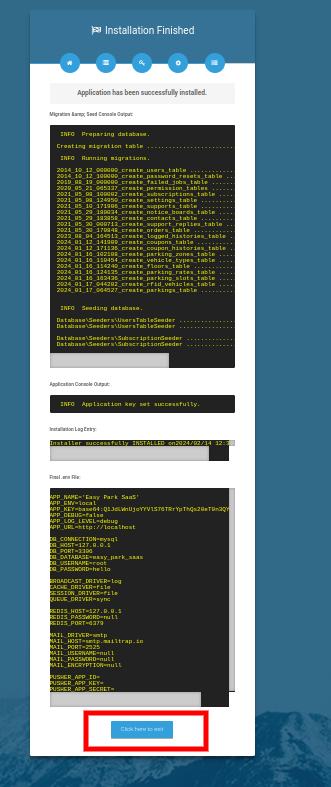
- FinishWhen you see Application has been successfully installed, click Click here to exit.
After installation
A few minutes of setup makes the difference between a demo and a working agency.
- Change the passwordsLog in as each default user and change the password under Settings → Password.
- Set the company and currencySettings → Company: name, address, phone, email and logo. These appear on certificates, receipts, quotes and your website. Set the currency and the number prefixes (policy, claim, customer, agent) in the same settings.
- Set up emailSettings → Email (SMTP), then send the test email. Invitations, sign-up confirmation, emailed app codes, renewal reminders and the weekly summary all need it.
- Add the cron lineSee Background work.
- Describe what you sellSee Setting up your business.
- Run the permission check on upgradeAfter an upgrade run
php artisan migrateandphp artisan permission:cache-resetso new permissions reach every role.
Background work (cron job)
Several things happen on their own: expiry notices, overdue flags, app reminders and the weekly summary. They need one cron line.
Option 1: the scheduler (recommended)
Add this cron entry in your hosting panel (Cron Jobs), running every minute, with the right path:
* * * * * cd /home/youraccount/public_html && php artisan schedule:run >> /dev/null 2>&1
| Job | When | What it does |
|---|---|---|
insurance:check-expiration | Daily 00:00 | Marks lapsed policies as expired and sends the notifications you set up under Email Notification. |
instalments:mark-overdue | Daily 00:10 | Flags unpaid instalments whose due date has passed. |
app:mobile-reminders | Daily 08:00 | Tells customers (inbox and phone push) about instalments due soon or late and policies due for renewal. Each reminder goes out once. |
insights:weekly | Mondays 07:00 | Emails each agency owner a week-over-week summary. |
Option 2: a web cron
If your host cannot run artisan, generate a key under Settings → Cronjob and call this address once a day:
https://yourdomain.com/cronjob?key=YOUR_KEY
Default logins
The installer creates these accounts so you can look around.
| Role | Password | |
|---|---|---|
| Super admin | superadmin@gmail.com | 123456 |
| Owner (agency) | owner@gmail.com | 123456 |
| Manager | manager@gmail.com | 123456 |
Roles & how it fits together
Policy Hub has four kinds of users. Each one sees only what they need, and every agency's data is kept apart from every other agency's.
| Role | What they do |
|---|---|
| Super admin | Runs the platform: agencies (owners), plans and pricing, transactions, coupons, platform settings, store links for the apps and AI usage across agencies. |
| Owner | Runs one agency: customers, agents, policies, claims, renewals, leads, quotes, payments, reports, website, apps and settings. Can create staff users and custom roles. |
| Agent | Works on their own book: their customers, policies, leads, claims, renewals, quotes, tasks and commission. Cannot see another agent's records. |
| Customer | Logs in to see their own policies, pay, file claims and ask the agency for things, on the web or in the app. |
The owner's menu
The menu is grouped by the work you do. A group or item only appears when you have the permission for it.
| Group | Items |
|---|---|
| Home | Dashboard, Staff Management (users, roles, logged history) |
| Sales & Customers | Leads, Lead Pipeline, Customer, Agent, Quotes, Referrals, Service Requests |
| Policies & Service | Policy, Insurance, Renewals, Claim, KYC, Payment |
| Communication | WhatsApp Inbox, Tasks & Calendar, Contact Diary, Notice Board, Website |
| Finance & Insights | Commission Rules, Commission Statement, Agent Commission, Reports, Analytics |
| AI | AI Assistant, AI Tools, AI Settings |
| Tools & Admin | Mobile Apps, Import / Export, Audit Log, N8N |
| System Configuration | Policy types, sub types, durations, Policy For, Document Type, Tax, Email Notification |
| System Settings | CMS, Pricing, Coupons, Settings |
Dashboards
Every login opens on a dashboard made for that person's day: what needs attention first, then the numbers.
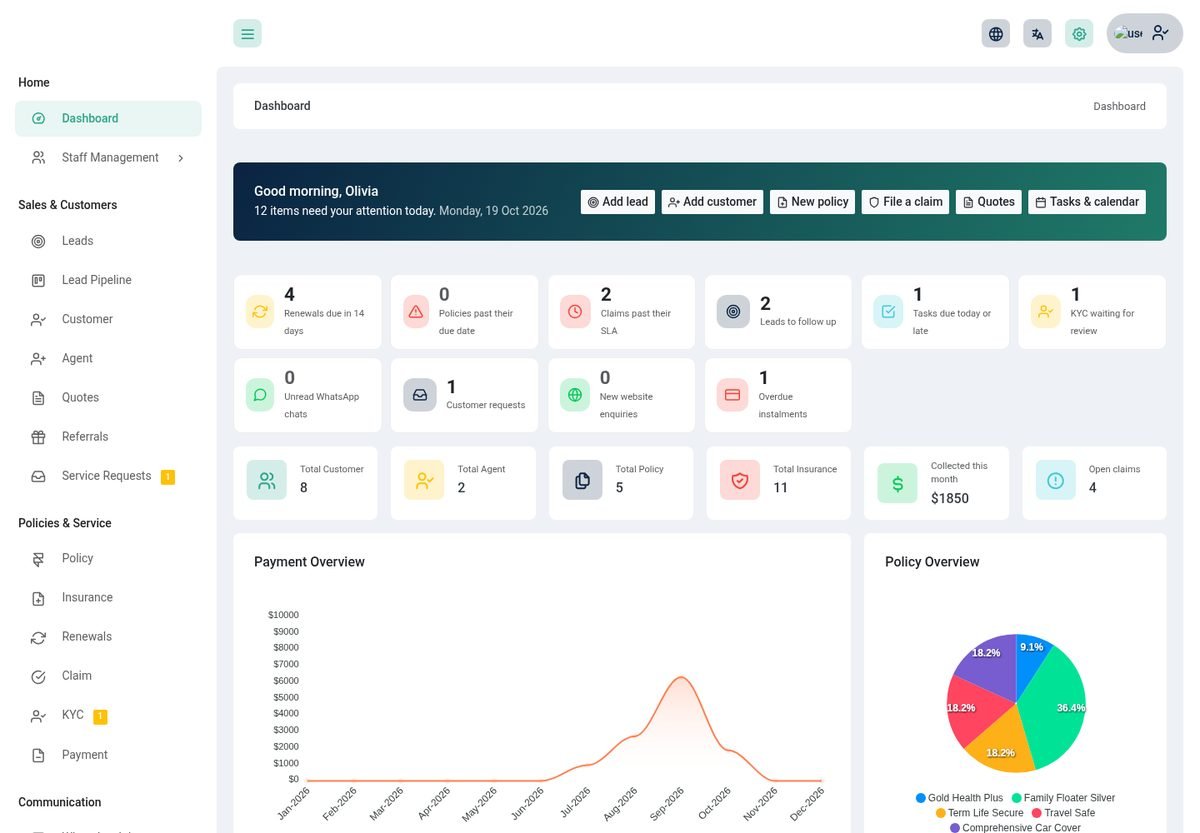
Owner
- Needs attention tiles for renewals due in 14 days, policies past their due date, claims past their SLA, leads to follow up, tasks due, KYC waiting, unread WhatsApp chats, new website enquiries, customer requests and overdue instalments. Each tile opens the right list.
- Key numbers: customers, agents, policies, insurances, premium collected this month and open claims, with a payment chart and a policy mix chart.
- AI summary of the last 7 days against the 7 before, and an Ask the assistant box (when AI is switched on, see AI tools).
- My tasks, renewals in the next 30 days, open leads, policies expired this month, claims this month, agents and payments.
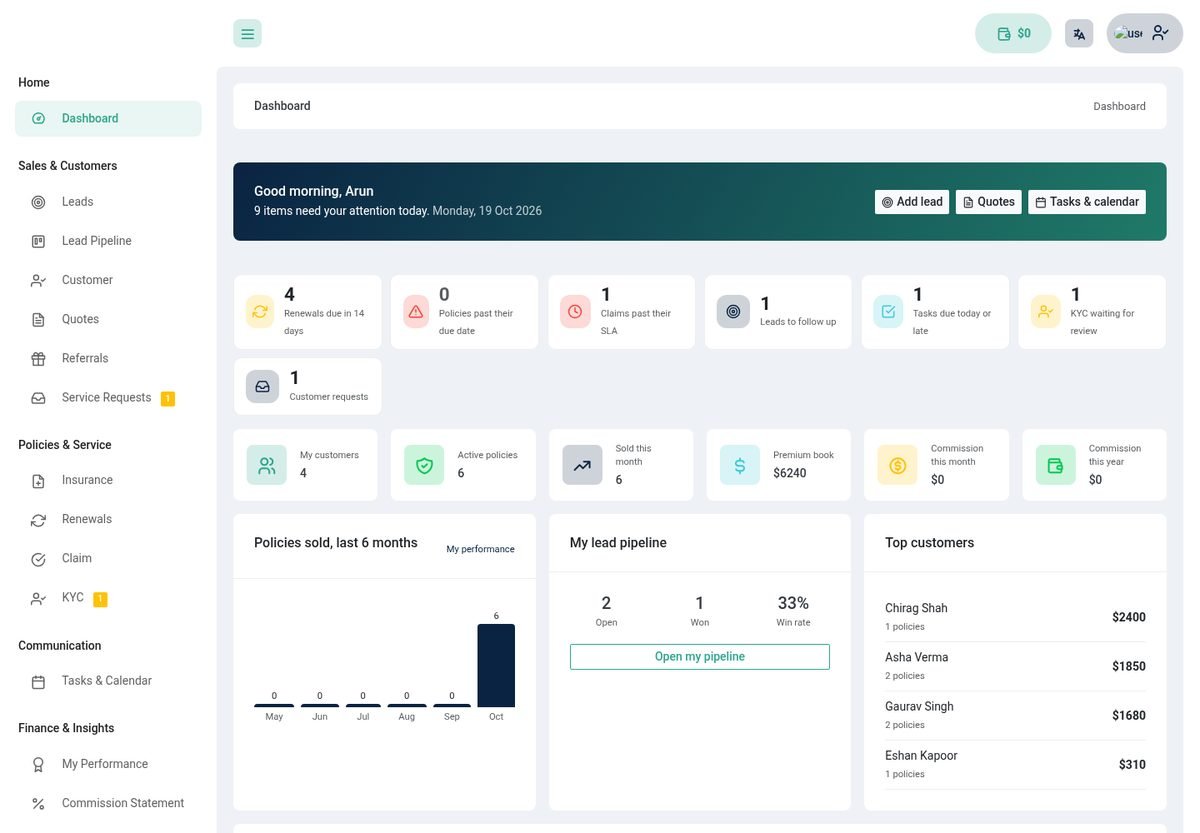
Agent
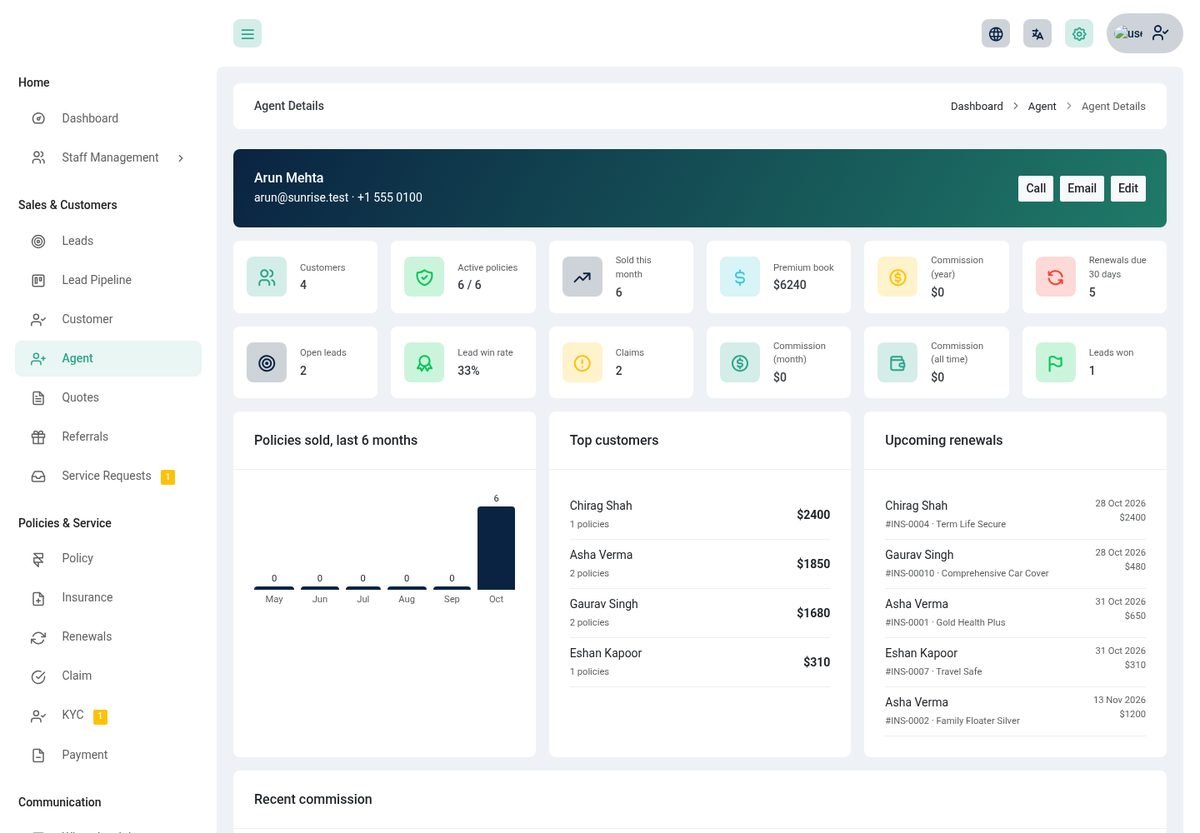
The same briefing, limited to the agent's own work, plus their customers, active policies, sold this month, premium book, commission this month and this year, a six-month sales chart, a lead pipeline summary and their top customers.
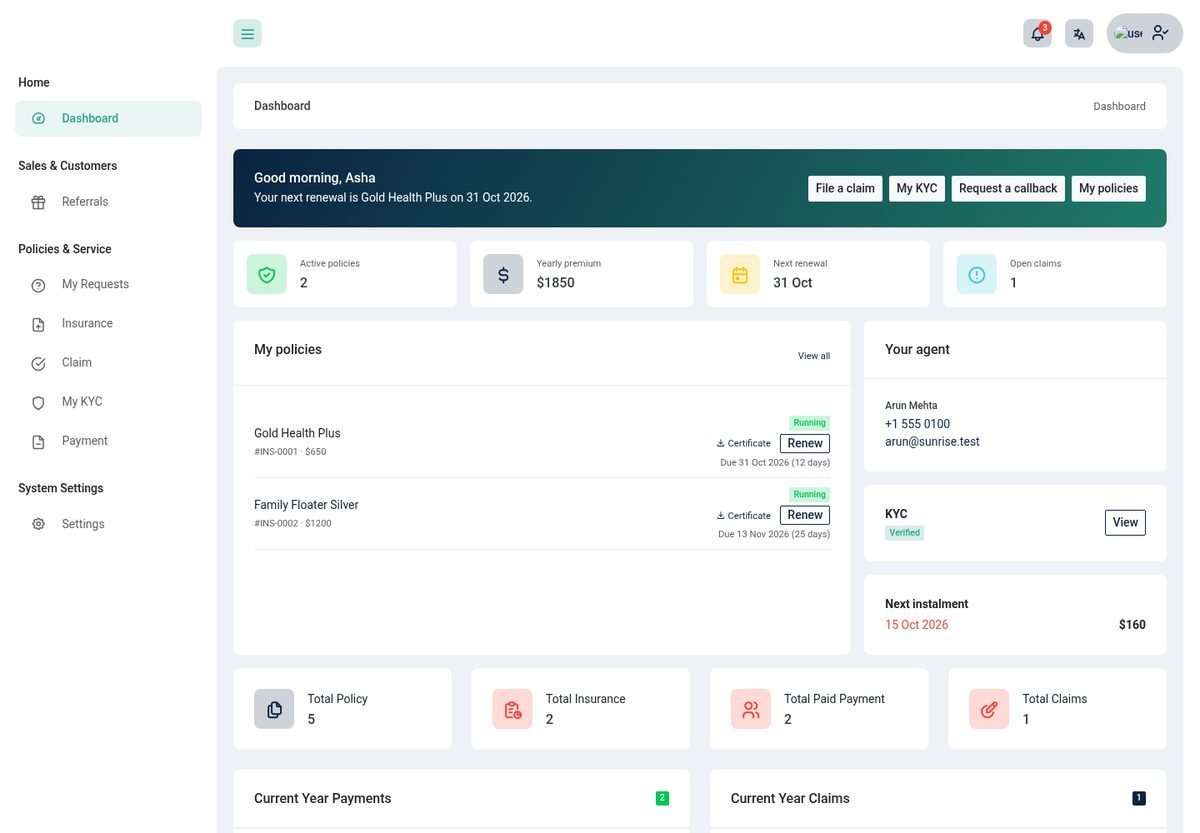
Customer
A greeting, active policies, yearly premium, next renewal, open claims, a list of their policies with days left, the next instalment, their agent (with call and WhatsApp), KYC status and, when the agency allows it, a chat with the assistant.
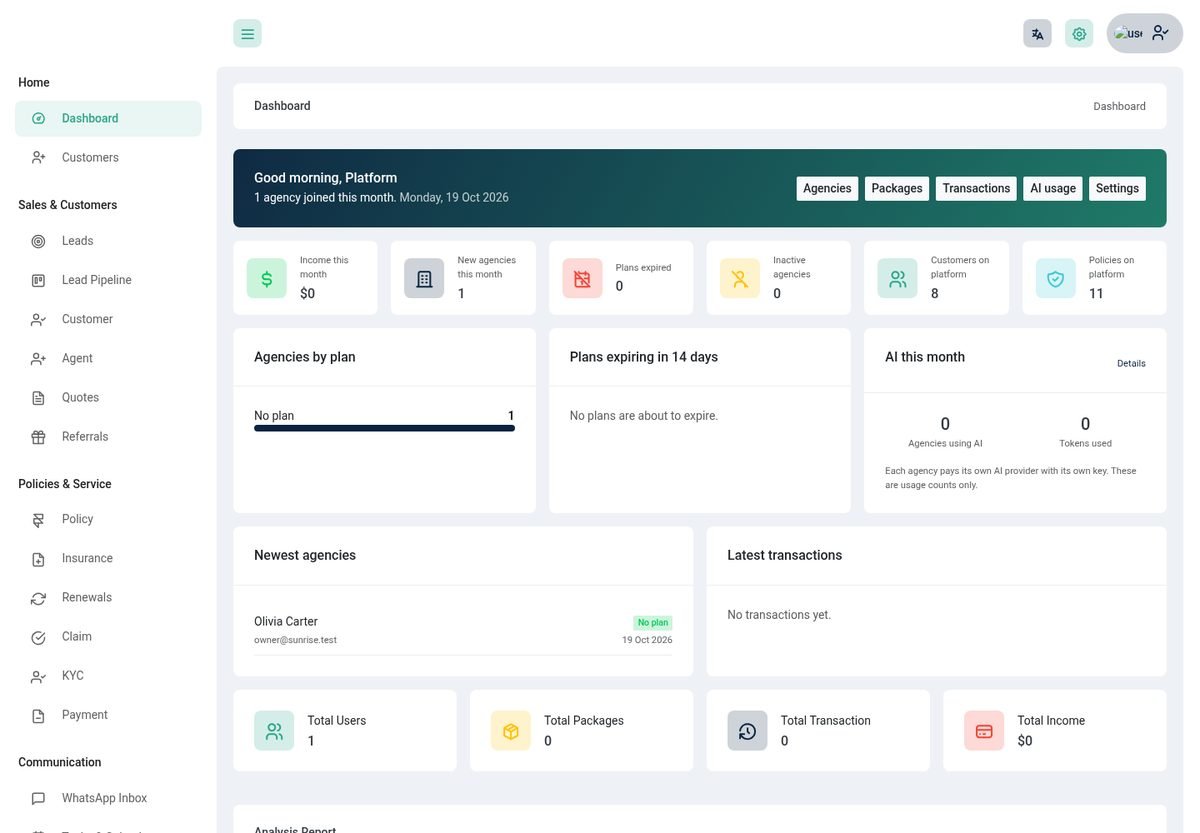
Super admin
Income this month, new agencies, expired plans, inactive agencies, customers and policies on the platform, agencies by plan, plans expiring in 14 days, AI usage this month, the newest agencies and the latest transactions.
Setting up your business
Describe what you sell once. Everything else (quotes, policies, claims, your website) builds on it.
- Policy types and sub typesSystem Configuration → Policy. A type is a line of business (Health, Motor, Life, Travel); a sub type refines it (Individual, Family).
- DurationsThe terms you offer (for example 12 or 36 months), used when pricing a policy.
- Policy ForWho a policy can cover (self, family, group).
- Document typesThe papers you ask for, for example ID proof or hospital bill. A policy lists the documents needed to buy it and the documents needed to claim on it.
- TaxesTax rates added to premiums.
- Policies (your products)Policy: title, type, sub type, cover (sum assured), coverage type, liability risk, pricing per term, tax, required documents and the default agent commission. Customers see these as plans on your website and in the app.
- Email notificationsSystem Configuration → Email Notification: renewal reminders by email, SMS and WhatsApp, with the days before or after expiry. See Messages & automation.

Customers & agents
Keep every person and everything about them in one place.
Customers
Add customers one by one, import them from a CSV, convert a lead, or let them sign up on your website. Each customer gets a customer number and can be assigned to an agent.
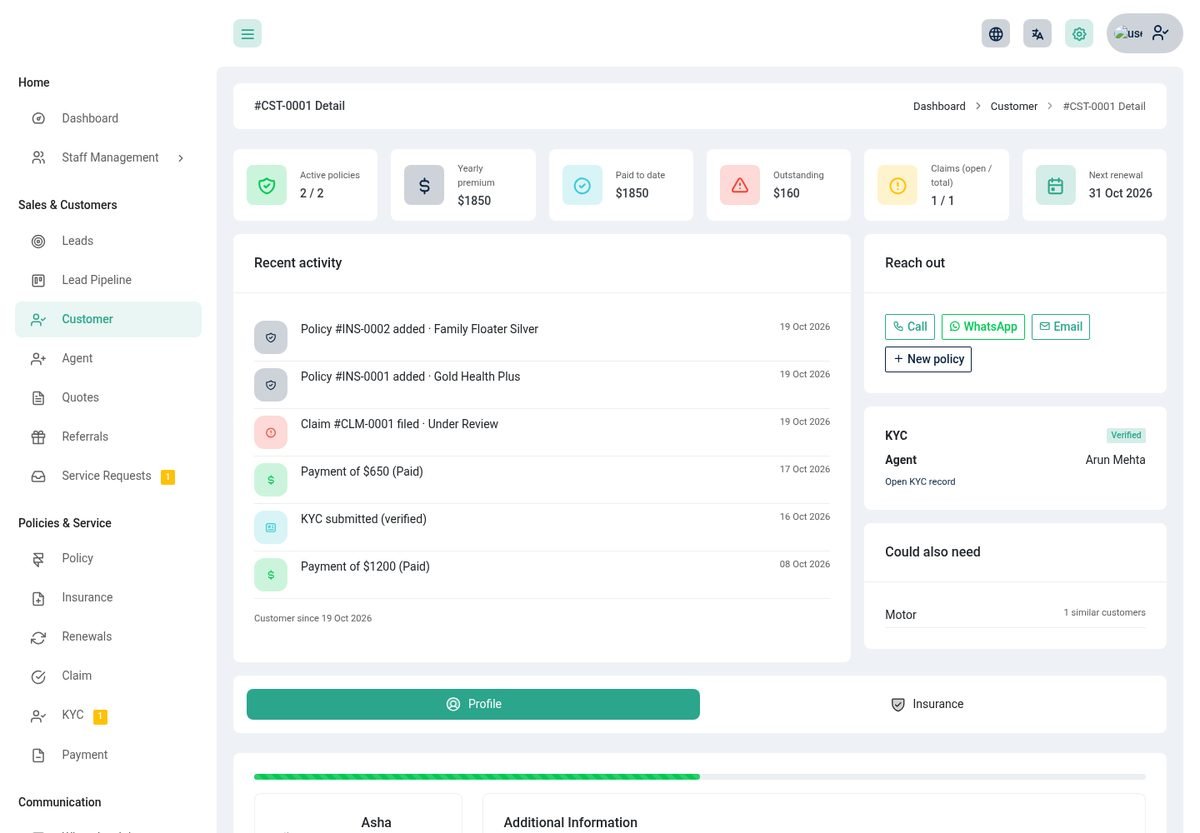
- A 360 summary at the top: active policies, yearly premium, paid to date, outstanding, claims (open and total) and the next renewal.
- Recent activity from policies, payments, claims and KYC.
- Could also need suggestions from what similar customers hold, and an AI summary button when AI is on.
- The profile, additional information and a tab for every policy with its payments and claims.
Agents
Agents are staff who sell and service policies. Create them under Agent; they log in with their own email and see only their own work.
Other staff
Under Staff Management → Users create staff with a custom role, and see who logged in and from where under Logged History.
Policies & lifecycle
An Insurance is a policy issued to a customer. It moves through a clear lifecycle and records every change.
- Issue the policyInsurance → Create: choose the customer, the policy (product), the term and the start date. The due date and premium follow from the term. If KYC is required the customer must be verified first.
- Add the detailsOn the policy page add insured persons, nominees and documents.
- Collect paymentRecord a payment, send a payment link, or split the premium into an instalment plan.
- Download the certificateA PDF certificate with the holder, cover, premium, dates, insured persons and nominees. Customers can download it too.

Policy actions
| Action | What it does |
|---|---|
| Renew | Starts the next term as a new policy linked to the old one. Leave the premium empty to keep it. |
| Endorse | Records a mid-term change with a note and an optional premium change. It appears under Policy history. |
| Cancel | Stops the policy with a reason. The reason is kept. |
| Reinstate | Brings a cancelled policy back into force. |
| Payment link | Creates a link the customer can pay from (needs Stripe or Razorpay). |
| Instalment plan | Splits the premium into equal instalments (monthly, quarterly or half-yearly). Overdue ones are flagged each day. |
Payments & receipts
Take premiums however your customers prefer and keep a clean record.
- Record a payment on a policy (cash, bank transfer, card). Bank transfers wait as In Process until you accept or reject them (Payment list).
- Pay online: customers pay what is due with Stripe (card) or Razorpay (UPI and card) on the provider's own page. The payment is recorded only after the provider confirms it. PayPal, Flutterwave, Paystack and bank transfer are also available in the classic payment form.
- Payment links: create a link for any amount and share it by message. It expires, and works without a login.
- Instalments: payments are matched to the oldest unpaid instalment automatically.
- PDF receipts for every settled payment, for staff and for the customer.
Renewals
Renewals are where an agency keeps or loses its income. The renewal board shows every policy about to expire and how likely it is to lapse.

- Choose how far ahead to look (7 to 365 days). Move a policy between Pending, Contacted, Quoted and Lost.
- Lapse risk is a transparent score out of 100. Every point has a reason, such as an earlier lapsed policy, overdue instalments or no contact yet, so you know what to act on.
- Renew a policy in one click. Agents see only their own policies.
- Reminders go out by email, SMS and WhatsApp on the days you set under Email Notification.
Claims
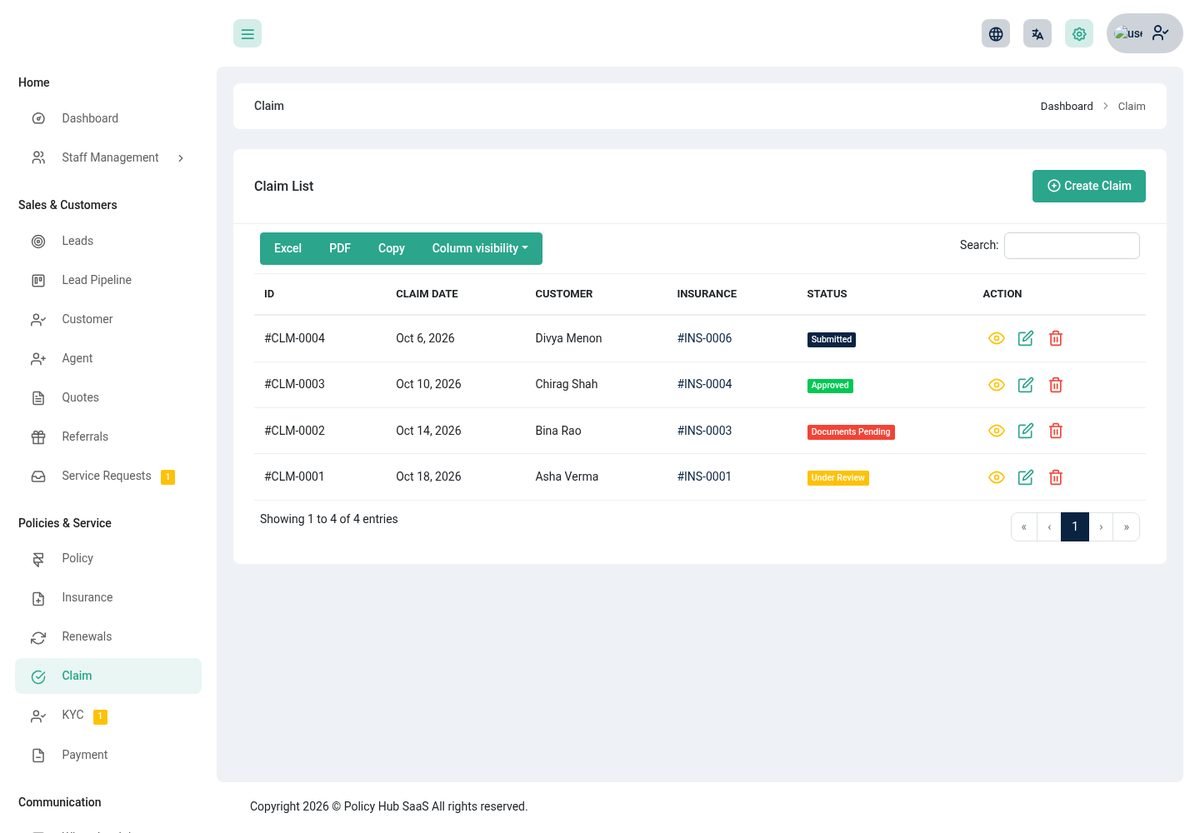
Claims follow a clear workflow with deadlines, a document checklist and a full history.
The workflow
A claim moves Submitted → Acknowledged → Documents pending → Under review → Surveyor assigned → Approved → Settled → Closed, or to Rejected from most stages. Only valid next steps are offered, and every change is written to the claim's history with who made it.
- Required documents: each policy lists the documents a claim needs. A claim cannot be Approved or Settled until every one is uploaded.
- SLA: each claim gets a due date (default 15 days, change it in Settings). Late claims are flagged and counted on the dashboard.
- Assign a claim to a handler, record the claimed and approved amounts, and add notes.
- Triage: automatic checks (a claim dated before the policy started, within 30 days of its start or after it expired, a claim with no policy, or missing documents) flag claims for a closer look. It is a prompt for review, not a decision.
- Customers follow progress in four steps (Submitted, In review, Approved, Settled), upload missing documents and get a notification at every status change.

Leads & pipeline
Capture every enquiry, score it, assign it and follow it to a sale.
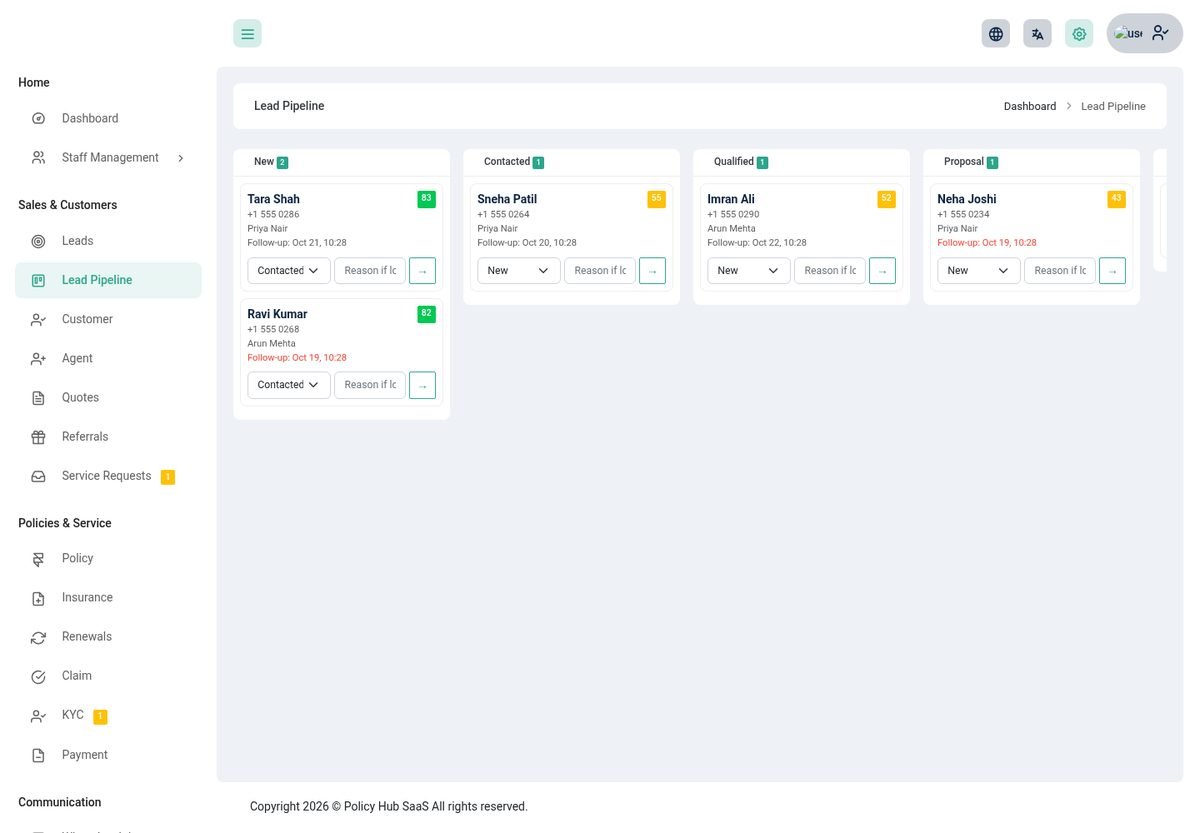
- Sources: add leads by hand, from your website enquiry forms, from referrals, from WhatsApp or by API.
- Stages: New, Contacted, Qualified, Proposal, Won and Lost (with a reason).
- Score out of 100 from how complete the lead is, its source, its stage, activity and recency, so you call the best ones first.
- Duplicate check on email and phone, with a warning before you create a second record.
- Assign by hand or switch on automatic assignment in Settings to share new leads between agents.
- Activities and follow-ups: log calls, emails, meetings and notes, and schedule a follow-up that becomes a task.
- Convert a lead to a customer in one step. Winning a lead can pay the referrer a reward.
Quotes
Compare your plans for a prospect and send a professional quote in minutes.
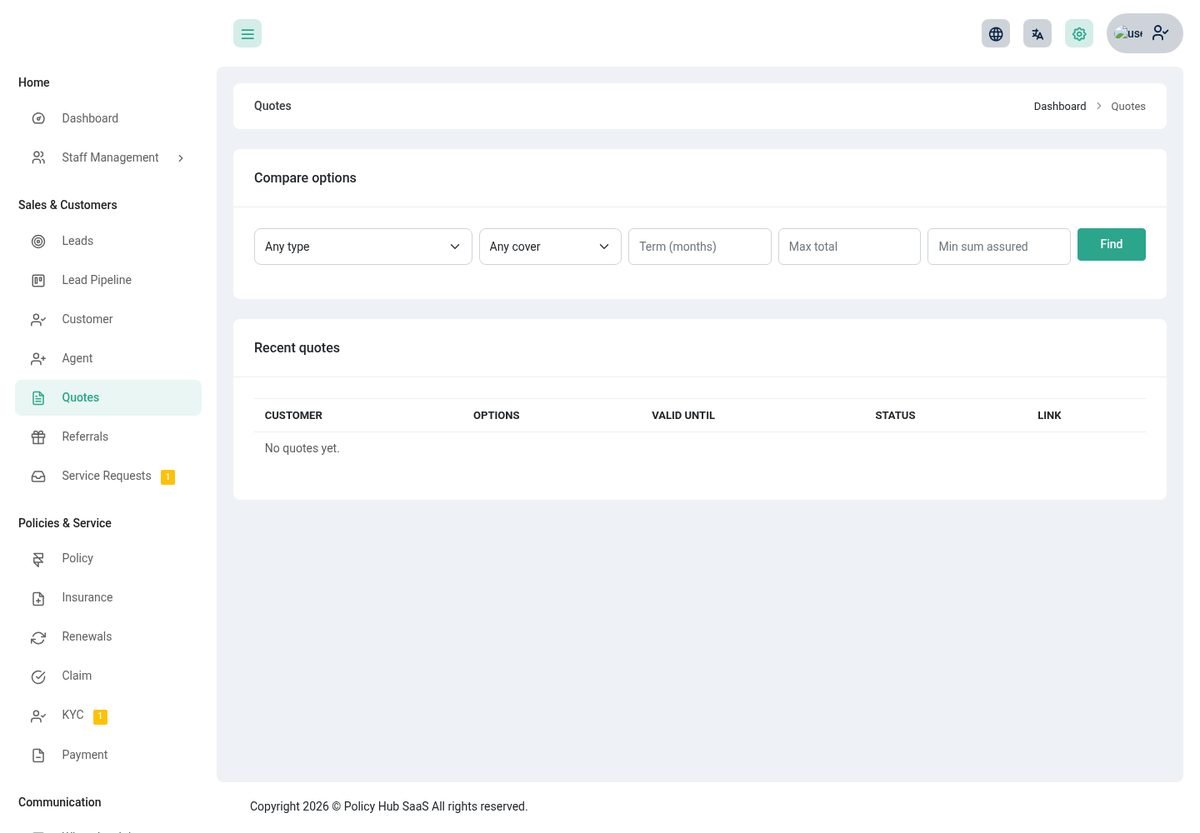
- Find plansFilter by policy type, coverage, term, maximum total and minimum cover. Totals include tax.
- Pick and sendChoose up to six plan and term combinations, add the prospect's name, email and phone, and create the quote.
- ShareThe prospect gets a link and a PDF. The link shows the options and lets them accept one.
- Follow upAccepting a quote creates or updates a lead for the agent.
Agents see only the quotes they made.
KYC
Check who your customer is before you insure them.
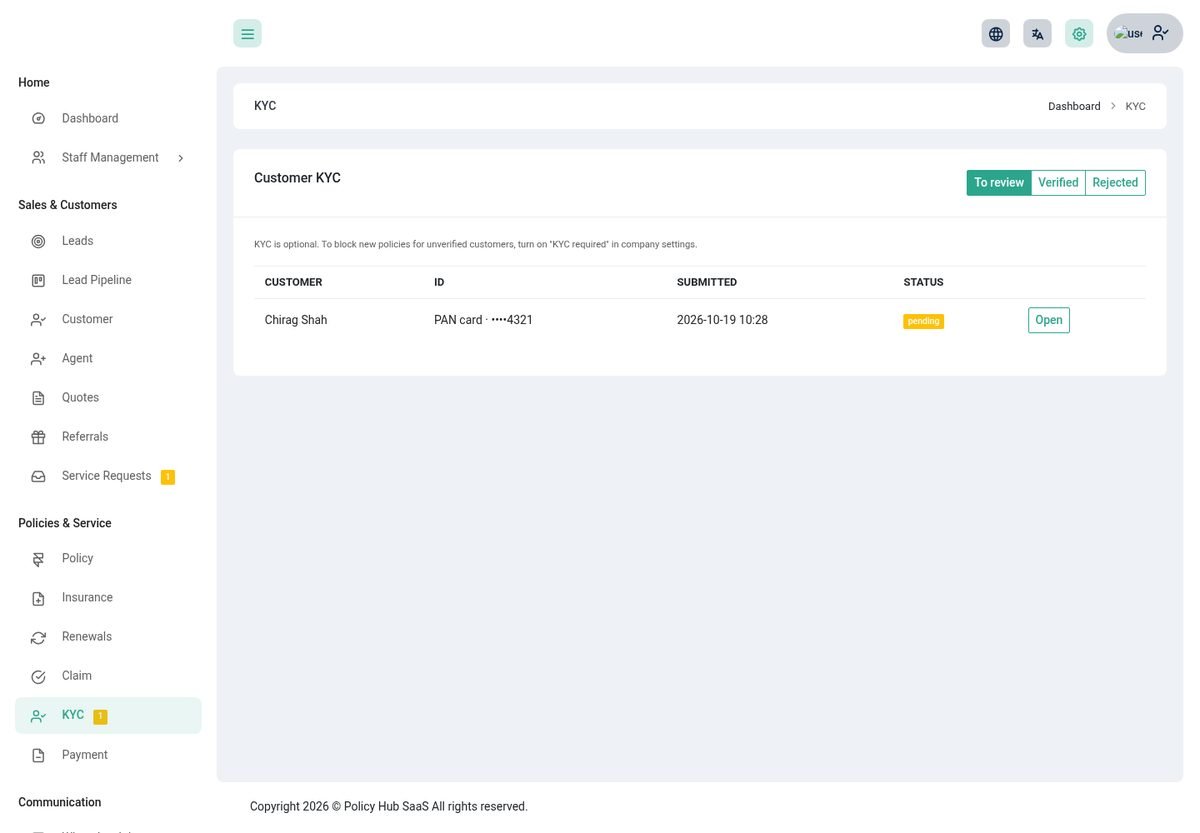
- Customers send their ID type, number and a photo or scan from the portal or the app. Supported: PAN, Aadhaar, Passport, Driving licence, Voter ID and other government ID. The number is validated and only the last four digits are shown.
- Staff approve (optionally with an expiry date) or reject with a reason. The customer is notified either way.
- Switch on KYC required before a policy in Settings and a policy cannot be issued to a customer who is not verified.
- The ID document is private: only the customer and the staff who may review it can open it.
Agent commission
Pay your agents correctly and on time.
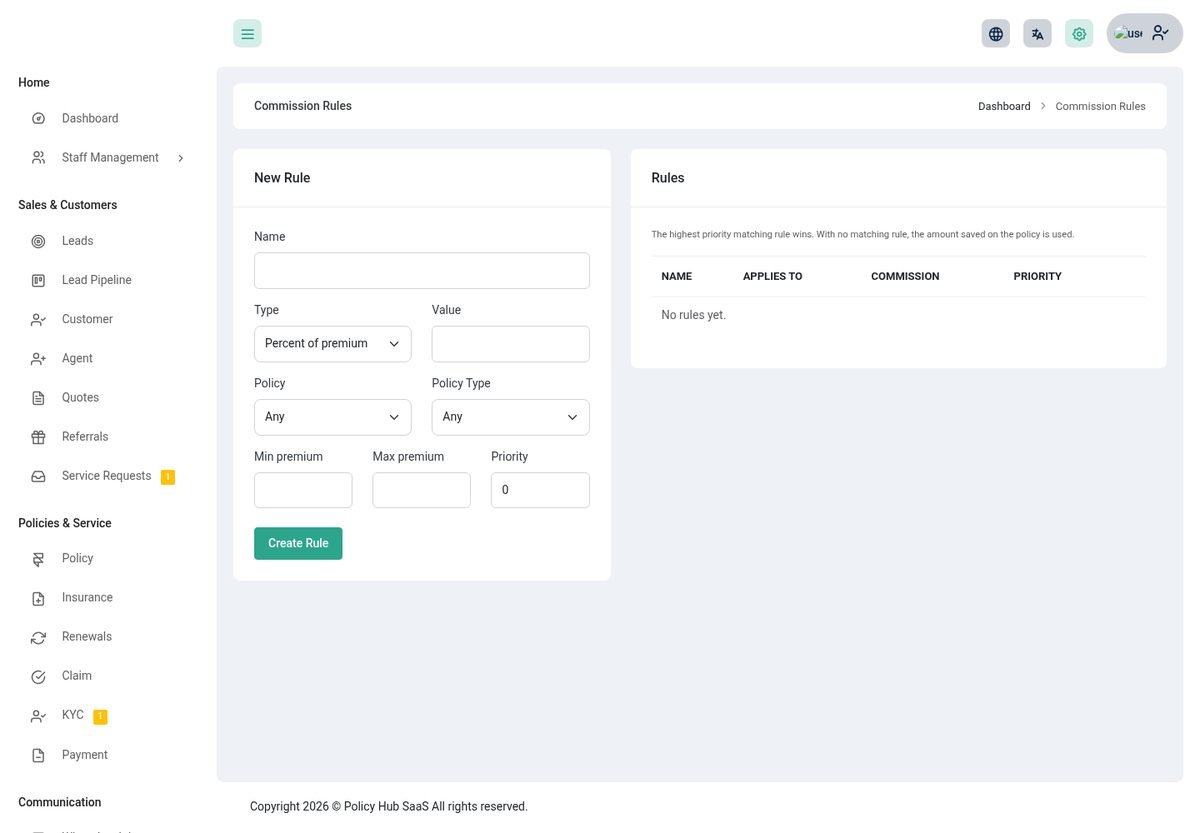
- Rules: set commission for a plan or a policy type, optionally for a premium band, as a percentage or a fixed amount. When several rules match, the one with the highest priority wins; a plan's own default commission is used when no rule matches.
- Earned automatically when a premium is paid, and reversed if the policy is cancelled.
- Statement: a per-agent statement for any period, on screen or as a PDF.
- Paying: only the owner marks a commission Paid or Rejected. Agents see their own statement and commission list and can never approve their own.
Tasks & calendar
Never lose a follow-up.
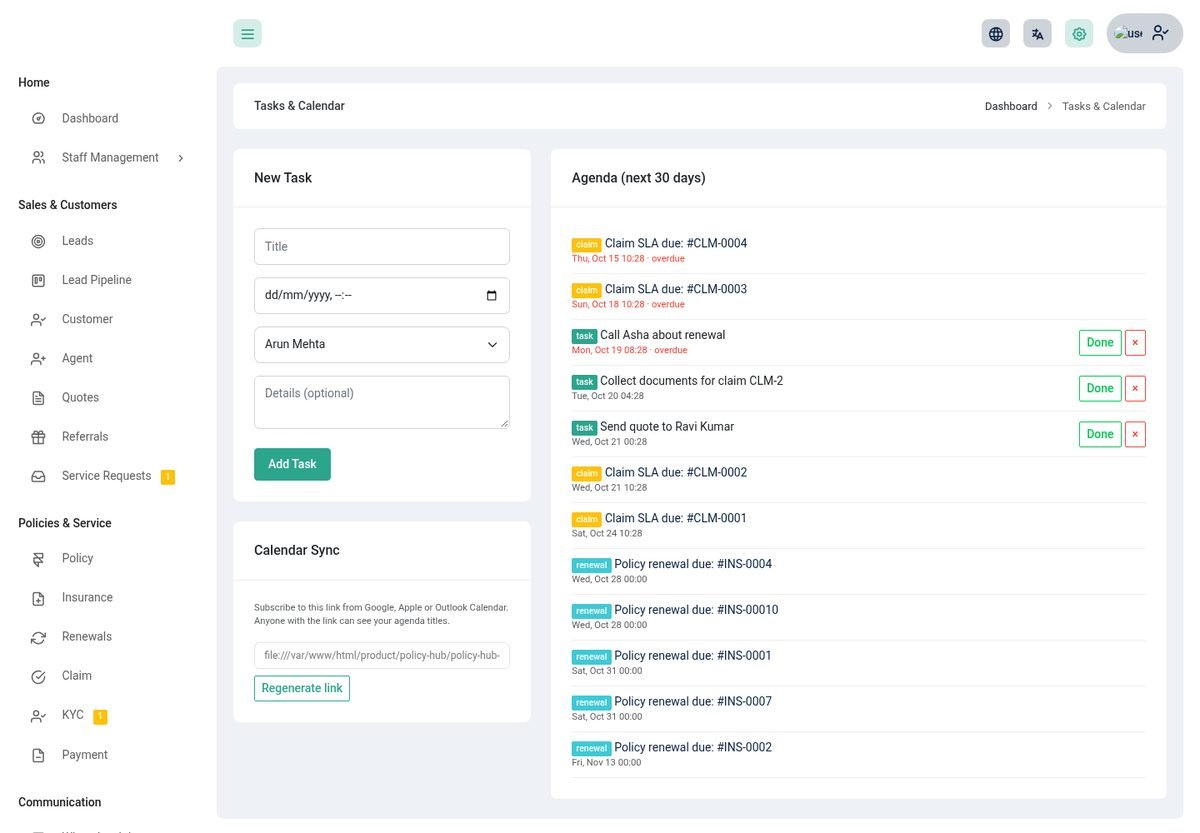
- Create tasks with a due date and an assignee, linked to a lead, claim or policy. Follow-ups, customer requests and call notes create tasks for you.
- The owner sees the whole team's tasks; an agent sees their own.
- Calendar feed: subscribe to your tasks in Google or Apple Calendar with a private address.
WhatsApp inbox
Talk to customers on WhatsApp from inside Policy Hub, through your Twilio account.
- Connect TwilioSettings → Twilio: account SID, auth token and your WhatsApp number.
- Set the webhookCopy your agency's private webhook address (shown to the owner on the inbox page) into Twilio. Messages are accepted only when Twilio's signature checks out.
- ReplyOpen a chat, reply, assign it to an agent, close or reopen it. Unread chats show a badge in the menu.
Reports & analytics
Know how the business is doing and what to do next.
Reports
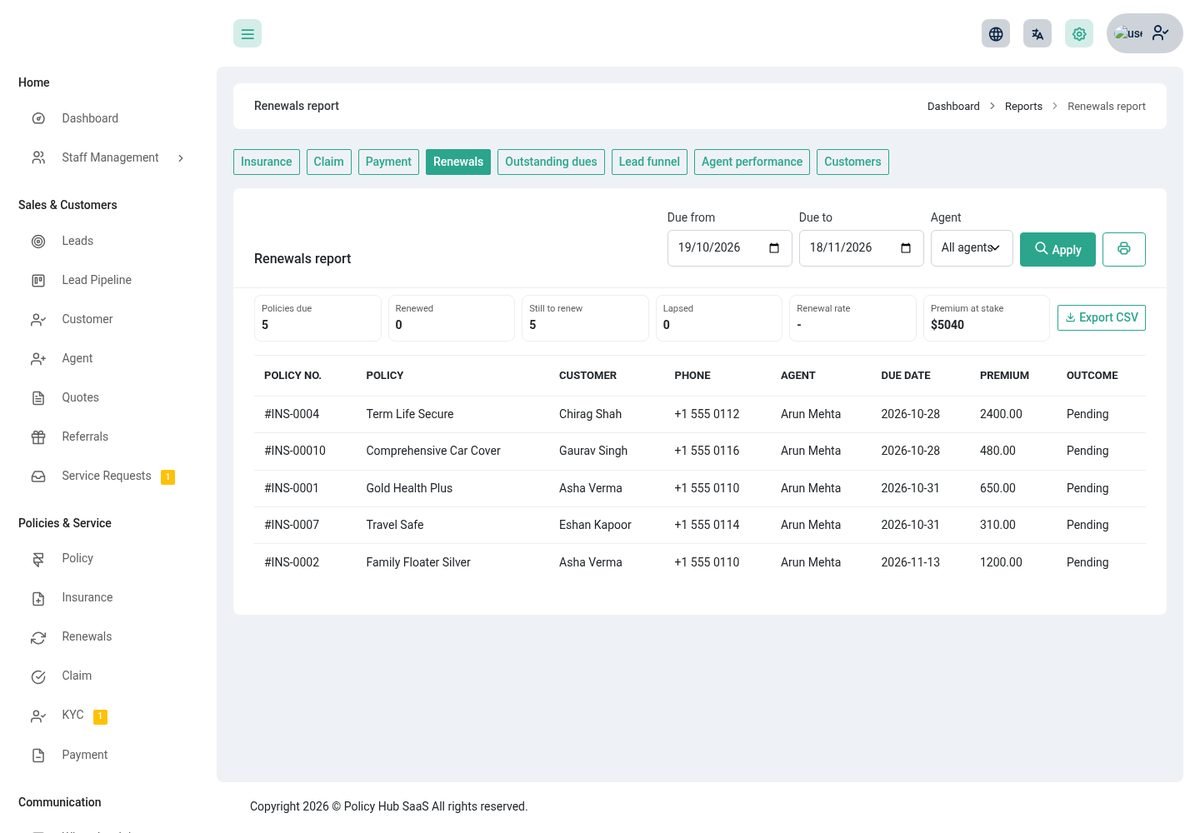
Under Finance & Insights → Reports. Every report has filters, summary figures, a table, print and a CSV download of the same rows.
| Report | Shows |
|---|---|
| Insurance | Policies by status and date, with premium totals. |
| Claim | Claims by status and date, claimed and approved amounts. |
| Payment | Payments received and awaiting, by customer or policy. |
| Renewals | Policies due in a period and the outcome: renewed, still to renew or lapsed, the renewal rate and the premium at stake. |
| Outstanding dues | Unpaid instalments with ageing (1-30, 31-60, 60+ days). |
| Lead funnel | Leads by source: won, lost, still open and win rate. |
| Agent performance | Policies, premium, claims, leads won and net commission per agent. |
| Customers | New customers, with policies, premium and KYC. |
Analytics
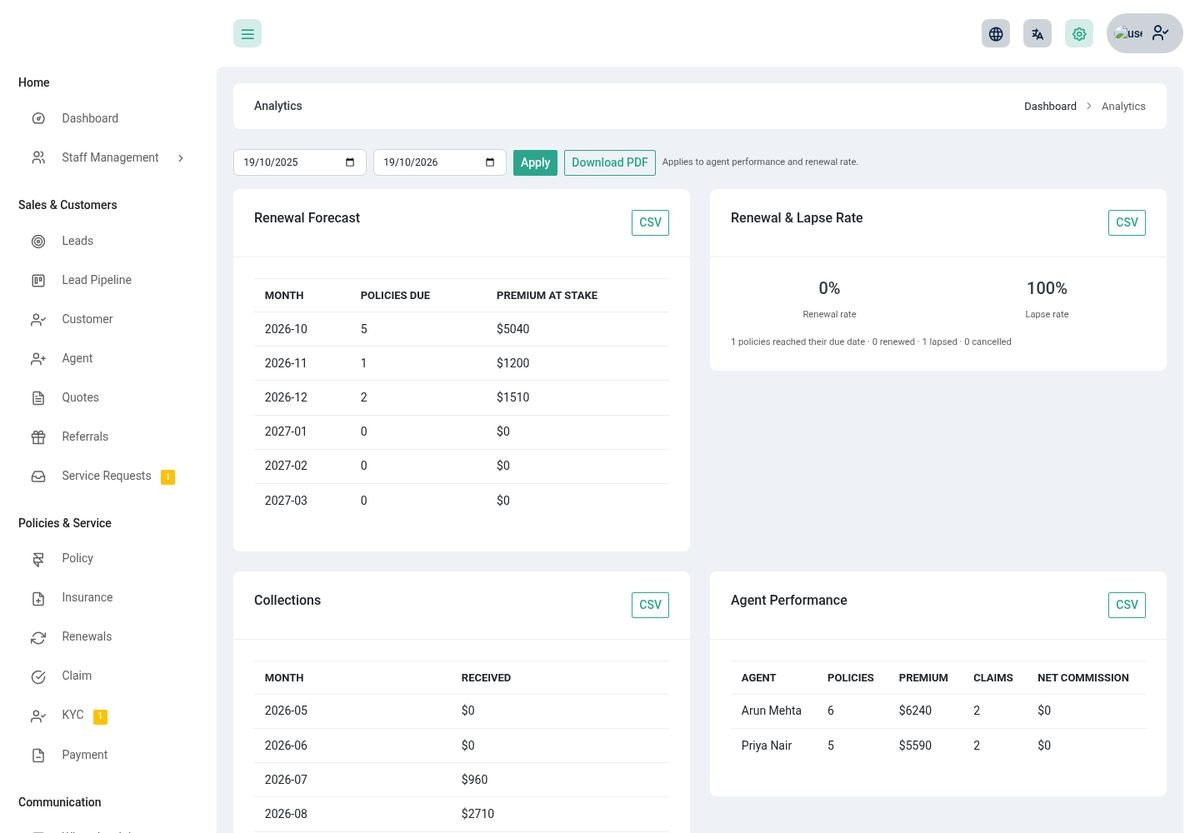
- Renewal forecast: policies and premium coming due month by month.
- Agent performance, renewal rate and collections (received, outstanding and overdue).
- Download each as CSV, or the whole page as a PDF.
Import, export & privacy
Move data in and out safely, and respect your customers' rights.
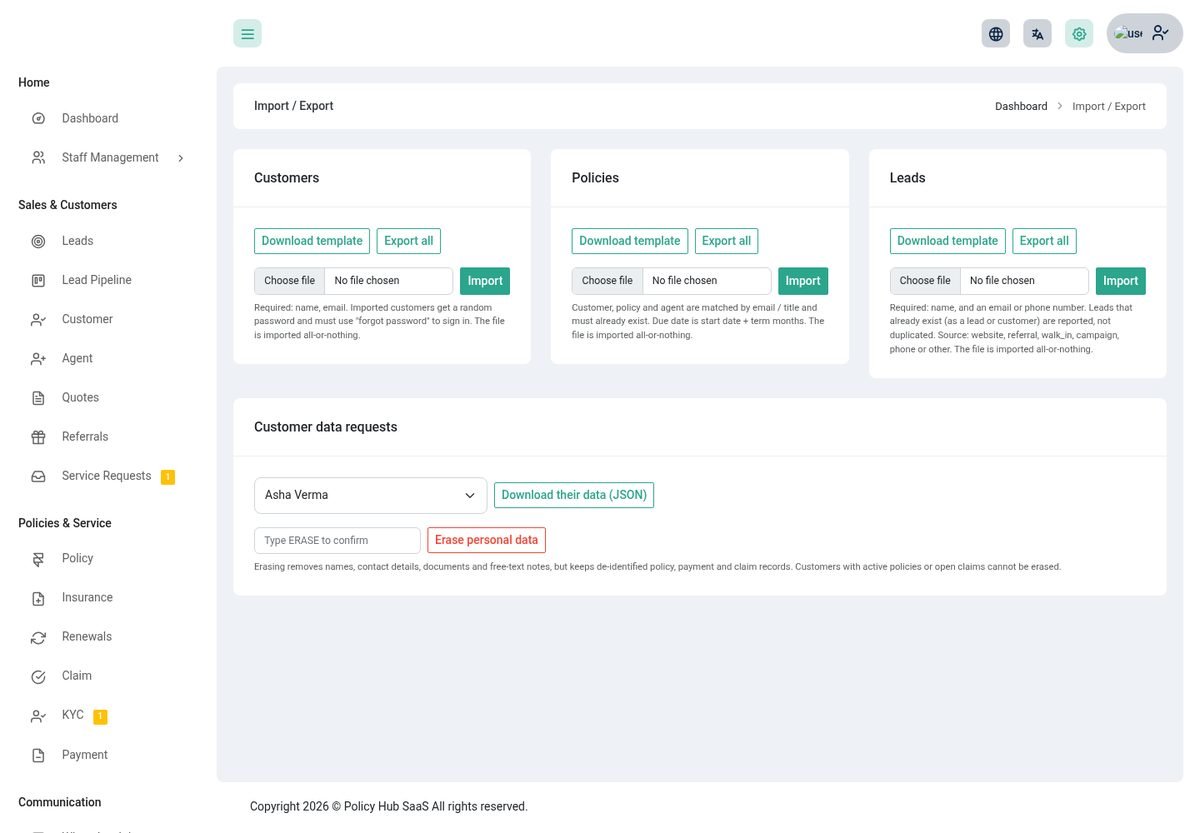
- Import customers, policies and leads from a CSV. Download the sample file, upload yours: rows with problems are listed by line number and skipped, and the rest are saved. Your plan's customer limit is respected.
- Export the same lists to CSV.
- Customer data: download everything held about a customer as a file, or anonymise a customer who asked to be forgotten. Policies and amounts stay for your records; personal details and uploaded files are removed.
Audit log
A record of who changed what.
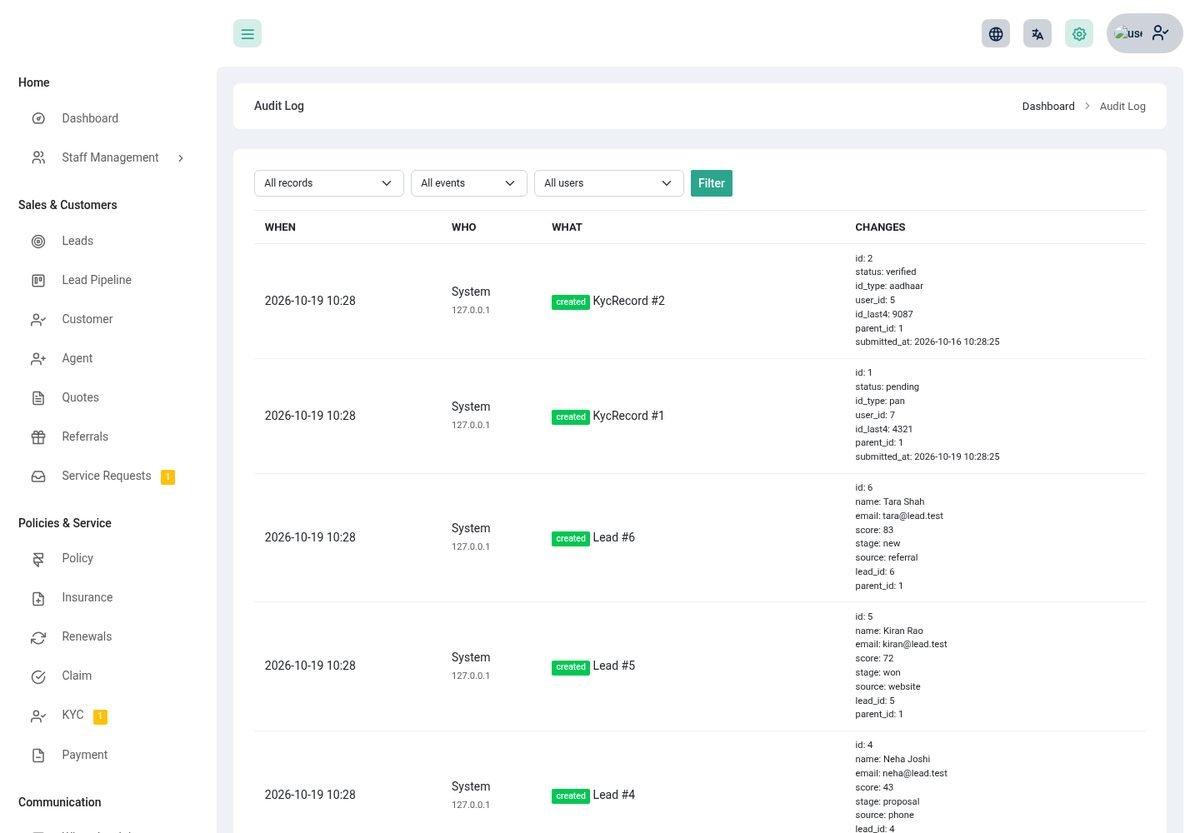
Policies, payments, claims and other important records write who changed them, when, and what changed. Filter and open any entry to see the detail. Only the owner can see it.
Referrals
Let happy customers and agents bring you new business.
- Every customer and agent has a personal link and code. A friend who fills in the form becomes a lead tagged with the referrer.
- Set the reward amount. When the lead is won the referrer earns it; the owner marks it paid.
- The referral page shows the link, the people referred and the rewards. The same is in the mobile app.
Customer portal
Customers use the same login page as your team. They land in a view that shows only their own records.
| Customers can | Details |
|---|---|
| See their policies | Status, cover, premium, days left, insured persons, nominees, documents and history. |
| Download a certificate | A PDF certificate for each of their policies. |
| Pay | Pay what is due with Stripe or Razorpay, see instalments and download PDF receipts. |
| File and follow claims | File a claim on their own policy, upload the documents it needs (always shown to staff as not verified until checked), and follow four progress steps. |
| Send KYC | ID type, number and a photo or scan; see the decision. |
| Ask the agency | See Requests & notifications. |
| Refer friends | Their personal link and reward status. |
| Manage their account | Profile, password, two-factor sign-in, download their data or ask for it to be deleted. |
| Ask the assistant | When the agency has switched the customer assistant on. |
Requests & notifications
Customers can ask for things without phoning, and always know what is happening.
My Requests
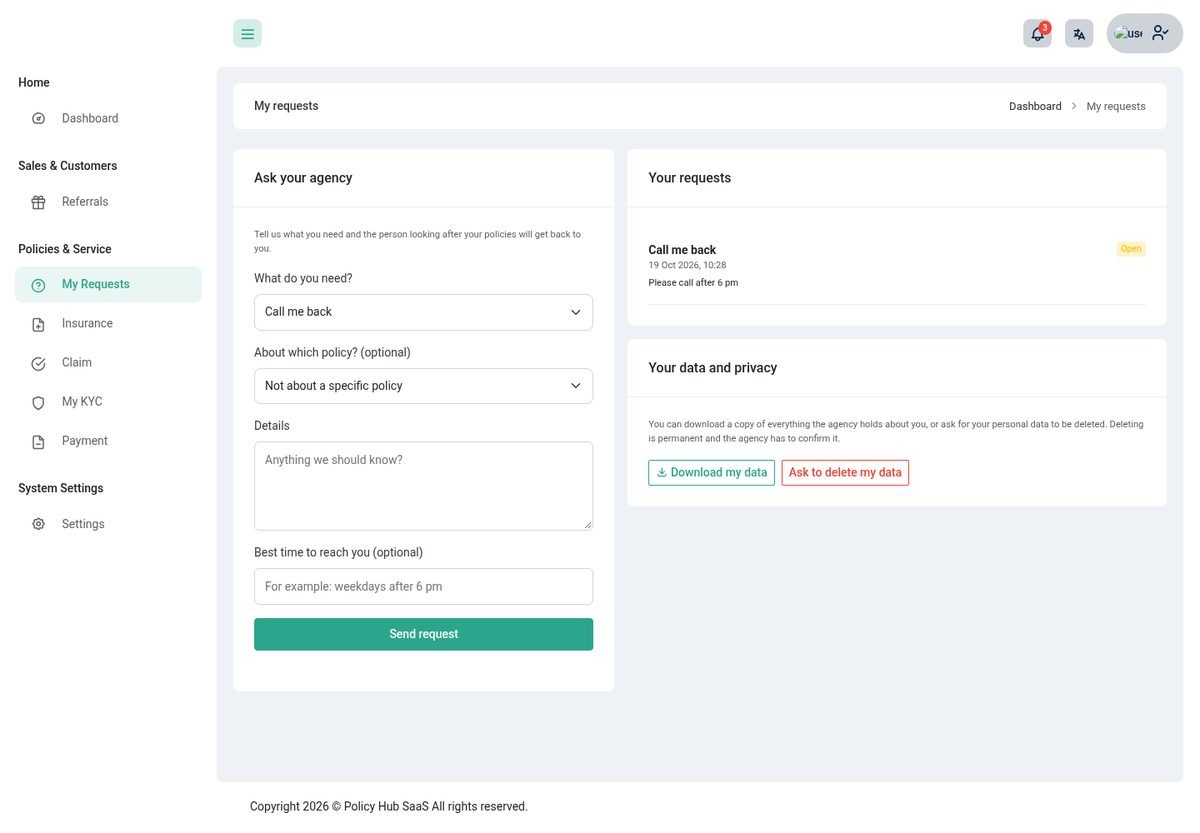
- A customer picks Call me back, Help me renew a policy, I want a quote, Change nominee or insured details or Something else, optionally about one policy, with a best time to call.
- The request becomes a task for that customer's agent (or the owner when they have none). Asking twice for the same thing does not create two.
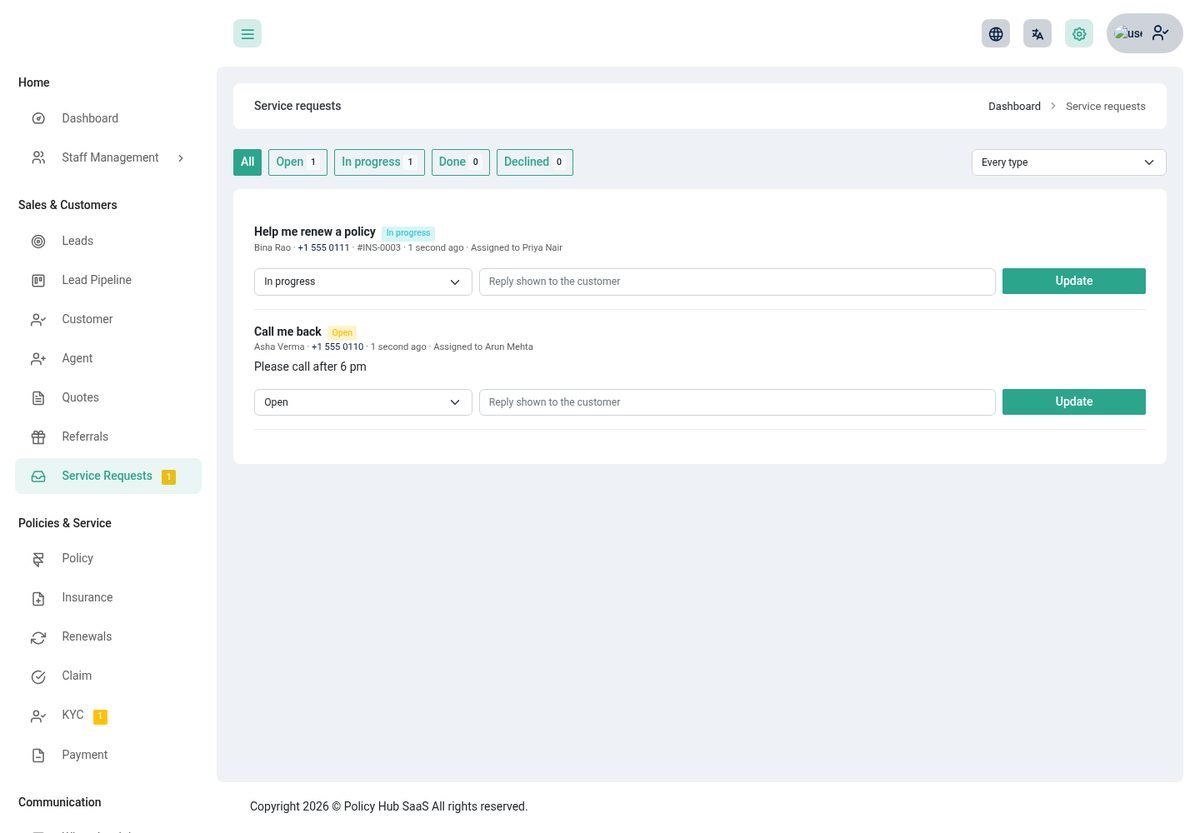
- Staff reply from Sales & Customers → Service Requests by setting a status (Open, In progress, Done, Declined) and a message the customer sees. The customer is notified.
- Privacy: Download my data and Ask to delete my data. Deletion is never instant: it creates a request for the owner, who confirms from Import / Export.
Notifications
Customers get a bell in the header (and an inbox in the app) with updates about claims, payments received, KYC decisions, instalments due or late, policies due for renewal and replies to their requests. The same messages are sent as phone push notifications once you set up push. Staff are never sent these.
Online sign-up
Let visitors register as your customers on your website.
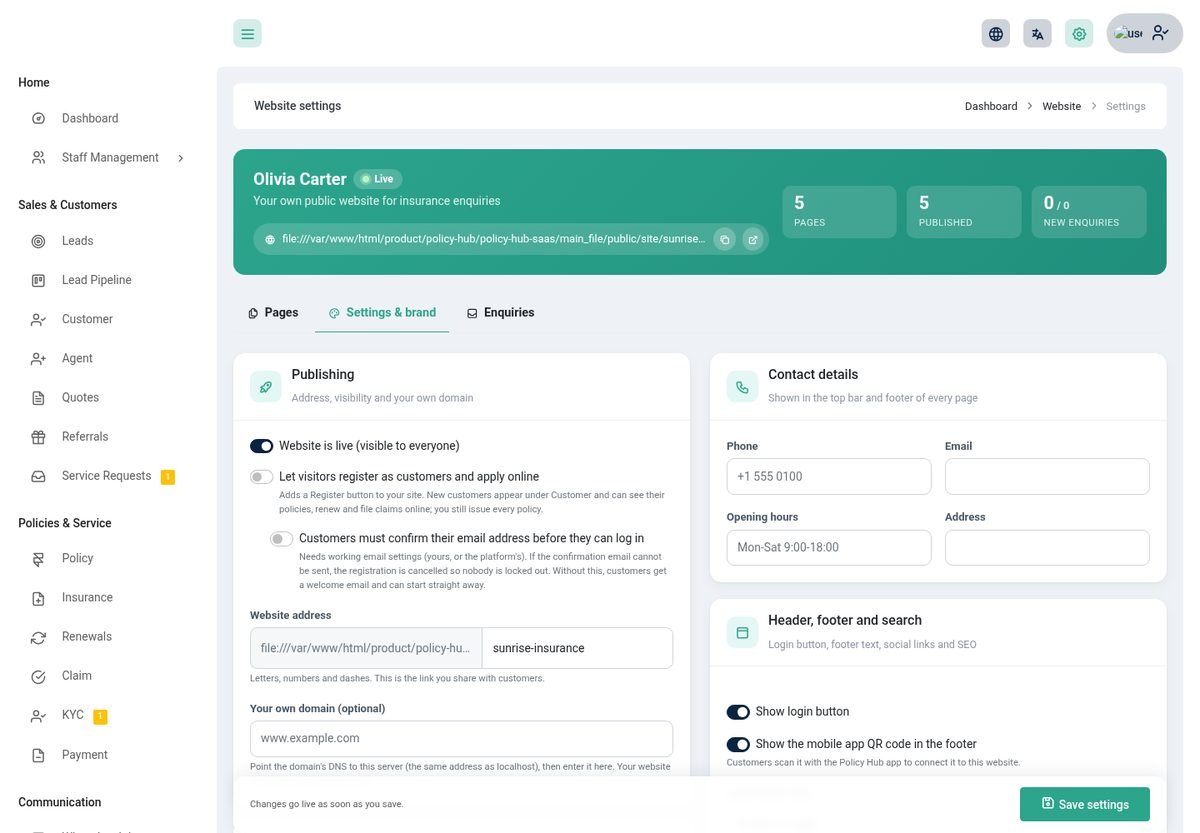
- Switch on Let visitors register as customers in Website → Settings. A Register button appears on your site.
- A visitor gives their name, email, phone and a password (at least 8 characters with letters and numbers). They become a customer of your agency only, and also appear under Website → Enquiries.
- Optionally require email confirmation first. A signed, time-limited link is emailed; if the email cannot be sent the registration is cancelled so nobody is locked out.
- If you require KYC, new customers are taken to complete it first.
- Your plan's customer limit is respected. Every policy is still issued by you.
Agency website
Every agency gets its own public website, included in the plan. Visitors browse plans, ask for a quote and register; you manage it from the admin panel.

Setting it up
- Open Websitein the Communication menu. A starter site with Home, About, Insurance plans, Get a quote and Contact pages is created for you.
- Brand itSettings & brand: name, tagline, colours, logo, contact details, login button, footer, licence / registration notice and social links.
- Edit the pagesEach page is built from blocks (hero, numbers, insurance products, premium estimator, feature cards, steps, call to action, enquiry form, contact and more). Add, reorder, duplicate or hide blocks. Texts are cleaned so only safe content is shown.
- PublishSwitch Website is live on. Draft pages stay private; you and your team can preview them.
What visitors get
- Plan pages: each priced plan has its own page with cover, price by term, who it is for, required documents and a request-a-quote form.
- Premium estimator and a products block that always shows your current plans.
- Enquiries become leads in your pipeline, with a follow-up task, and appear under Website → Enquiries (filter, update status, download CSV).
- Search-friendly: page titles and descriptions, a sitemap and structured data for an insurance agency.
- Your own domain: enter it under Publishing and point its DNS at your server. Your website then answers on that domain. Without one it lives at
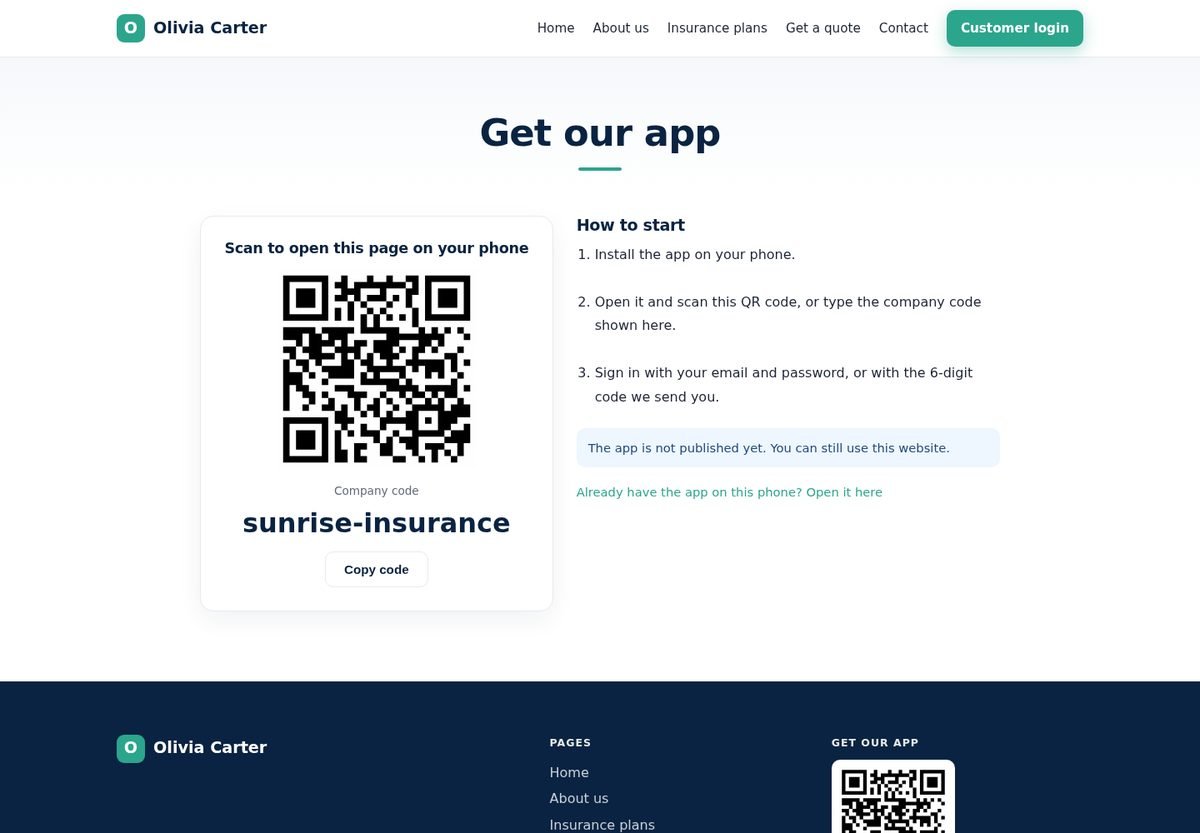
/site/your-name. - Get our app: a page with a QR code and the store links, and an optional QR code in the footer. See Mobile apps.
Mobile apps
One Android app and one iPhone app serve every agency. Customers find their agency, sign in and manage their insurance from their phone.
Finding the agency
An agency's company code is the name in its website address (/site/sunrise-insurance is sunrise-insurance). A customer reaches it three ways: search by name or city, type the code, or scan the QR code on the Get our app page or the website footer. When a phone scans the QR code the app asks Connect to this company? before trusting the address. After that, the app takes on the agency's name, logo and colour.
In the app
- Home: yearly premium, what is to pay, late payments, the next instalment and renewal, a button to call or WhatsApp the agent, KYC status and quick actions.
- Policies: details, insured persons, nominees, instalments, payments, documents, the certificate PDF and receipts, and Pay (Stripe or Razorpay in the phone's secure browser).
- Claims: file a claim, follow its four steps and timeline, and upload the documents it needs from the camera, gallery or files.
- Inbox: the same notifications as the website bell, with a badge, opening the right claim or policy.
- More: profile, Ask my agency (callback, renewal, quote, change, data download and deletion request), KYC, refer a friend, plans with a request-a-quote button, the AI assistant (when switched on), switch company, change password, sign out of all devices and fingerprint or face unlock.
Signing in and security
- Email and password, or a 6-digit code sent by email. The owner chooses which under Mobile Apps (at least one stays on).
- Two-factor sign-in is supported, as are Forgot password, changing the password (which signs every other phone out) and Sign out of all devices.
- A bad sign-in always gives the same message, so nobody can find out who is a customer. Attempts are rate limited. An app that has not been used for 90 days asks for a new sign-in.
- The token is kept in the phone's Keychain or Keystore. Unlocking with a fingerprint or face is optional.
What you control
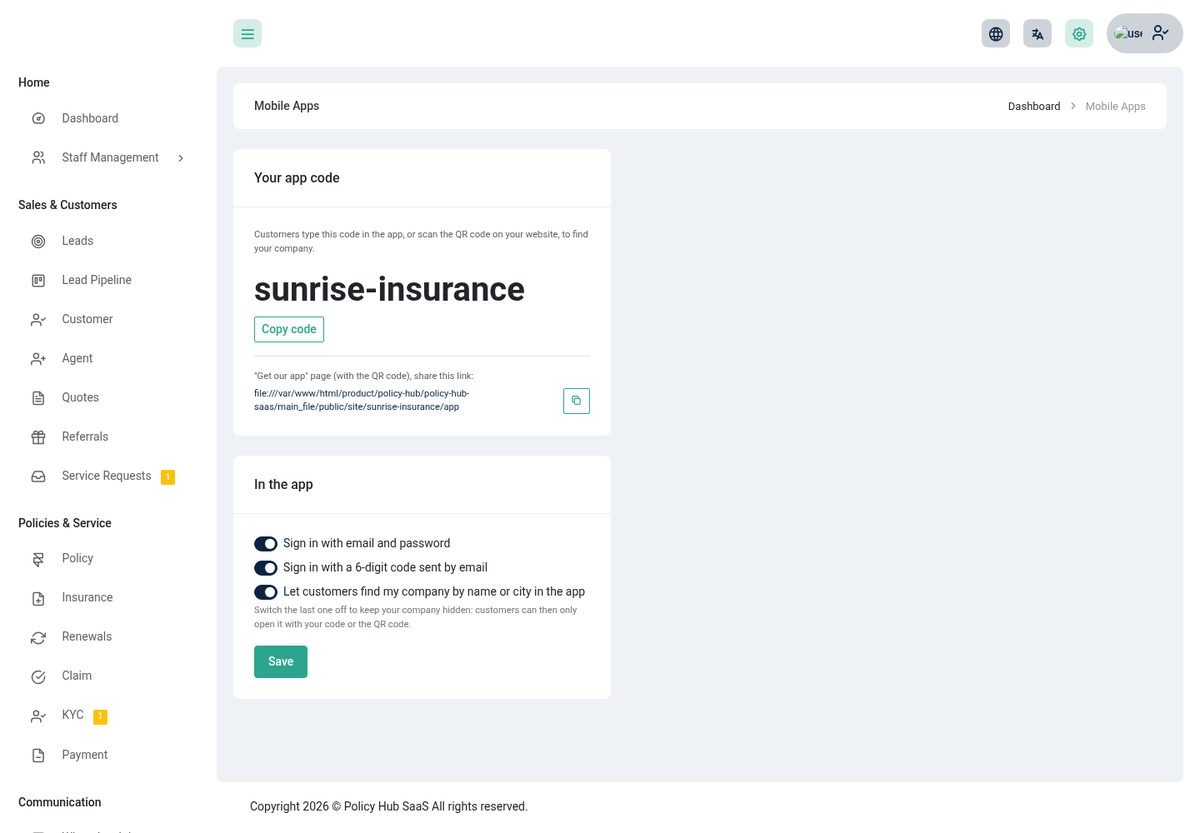
- Your app code and the address of your Get our app page, to share with customers.
- Sign in options: password, emailed code, and whether customers can find you by name or city. Switch the last one off to be reachable only by code or QR.
- QR code in the website footer: Website → Settings.
The platform owner
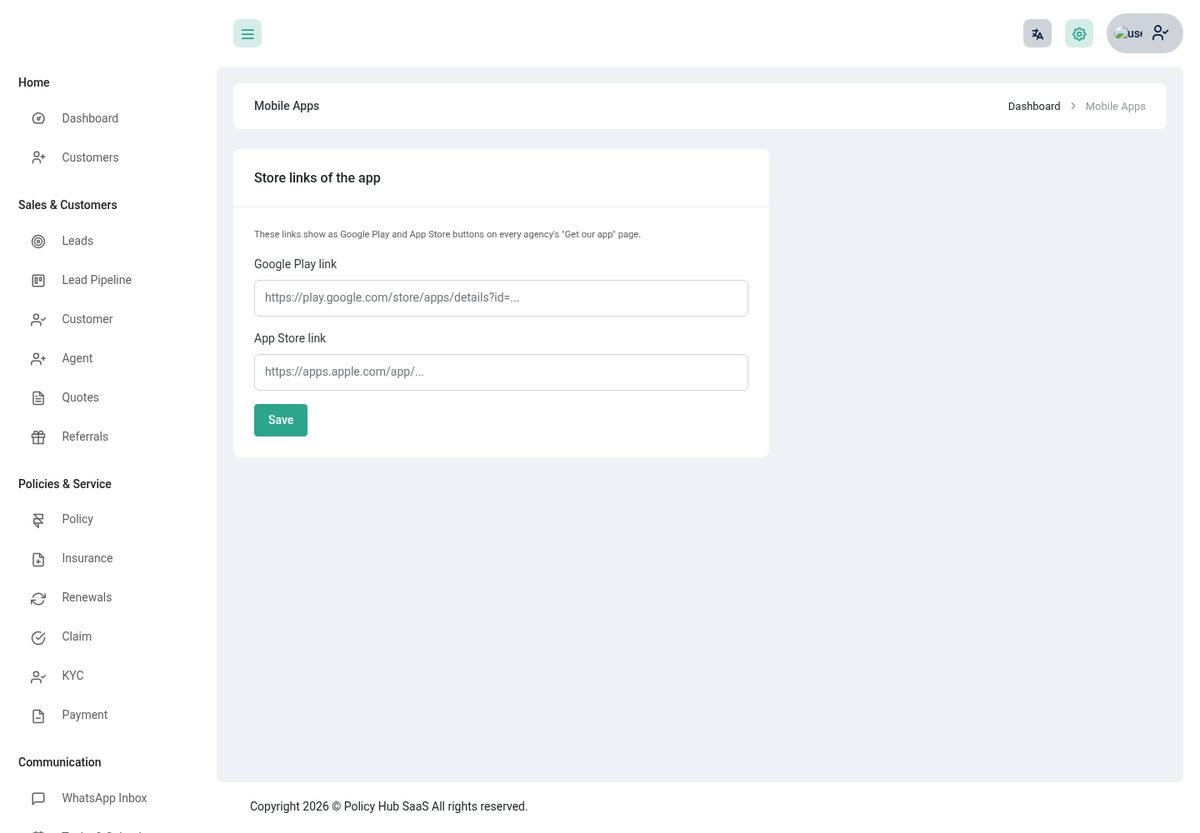
The super admin sets the Google Play and App Store links once under Mobile Apps. They show as buttons on every agency's Get our app page. Agencies do not set store links.
Build & publish the apps
The apps are two Flutter projects in the mobile_app folder: android_app and iphone_app. They share the same screens; mobile_app/check-sync.sh tells you if the two have drifted apart.
- Install Flutterand, for Android, Android Studio; for iPhone, a Mac with Xcode and an Apple developer account.
- Test itIn the app folder run
flutter pub get,flutter analyzeandflutter test. - Point it at your serverBuild with your address so customers never type it:
flutter build appbundle --dart-define=API_BASE_URL=https://yourdomain.com
Add--dart-define=COMPANY=your-codeto build an app for one agency only, without the company screen. - Make it yoursChange the app name, icon and bundle id (
com.policyhub.policy_hub_app) to your own before publishing. The README in each folder lists the exact files. - PublishAndroid: sign the bundle and upload it to Google Play. iPhone: archive in Xcode and submit through App Store Connect.
- Add the store linksThe super admin pastes the two store links under Mobile Apps.
Push notifications (optional)
Without this the app works and the in-app inbox still fills up; only the phone pop-ups are missing.
- Create a Firebase projectand add the Android and iPhone apps to it.
- iPhoneUpload your Apple push key (APNs) in Firebase.
- Download the service accountIn Firebase open Project settings → Service accounts and generate a private key (a JSON file). Put it in a private folder on the server.
- Tell Policy Hub where it isAdd
FCM_CREDENTIALS=/path/to/file.jsonto.env. - Make sure cron runsSee Background work.
The server sends a push, and adds the message to the inbox, when a claim changes status, a payment is received, KYC is decided, the agency answers a request, an instalment is due soon or late, and a policy is due for renewal (30, 14, 7 and 1 days ahead). Each reminder goes out once.
Controls
Setting in .env | Default | Meaning |
|---|---|---|
MOBILE_MIN_APP_VERSION | 1.0.0 | Older apps are asked to update. |
MOBILE_MAINTENANCE | false | Shows “back soon” in the app while you upgrade. |
MOBILE_REMINDER_DAYS | 2 | How many days before an instalment is due the reminder goes out. |
MOBILE_TOKEN_IDLE_DAYS | 90 | Sign out an app unused for this many days (0 = never). |
FCM_CREDENTIALS | - | Path to the Firebase key for push. |
AI tools
Optional assistants that save your team time. AI is a plan feature, and every agency uses its own API key, so AI costs are billed to the agency by its provider.
What it can do
| Tool | For | What it does |
|---|---|---|
| Dashboard summary | Owner and agents | A short written summary of the last 7 days against the 7 before, with the numbers behind it. Without AI you still get the numbers. |
| Staff assistant | Owner and agents | Ask in plain words: policies expiring, overdue instalments, claims by status, find a customer, lead pipeline, my tasks, what needs attention. It answers from your own data only. |
| Message writer | Staff | Drafts a renewal reminder, payment reminder, thank-you, follow-up or claim update by email, WhatsApp or SMS, in the tone and language you choose. You review and send. |
| Summaries | Staff | A short summary of a customer or a claim, with cross-sell ideas. |
| Document reading | Staff | Suggests policy details from an uploaded document. Nothing is saved automatically. |
| Call notes | Staff | Turns call notes (or an audio file) into a summary and action items, and can create the tasks. |
| Customer assistant | Customers | Off by default. When on, customers ask about their own policies, claims and payments on the web and in the app. It cannot change anything and can pass a request to a human. |
Plans and each agency's own settings
- The super admin switches Include AI tools on or off per plan (Pricing → Packages). Without it, AI menus stay hidden.
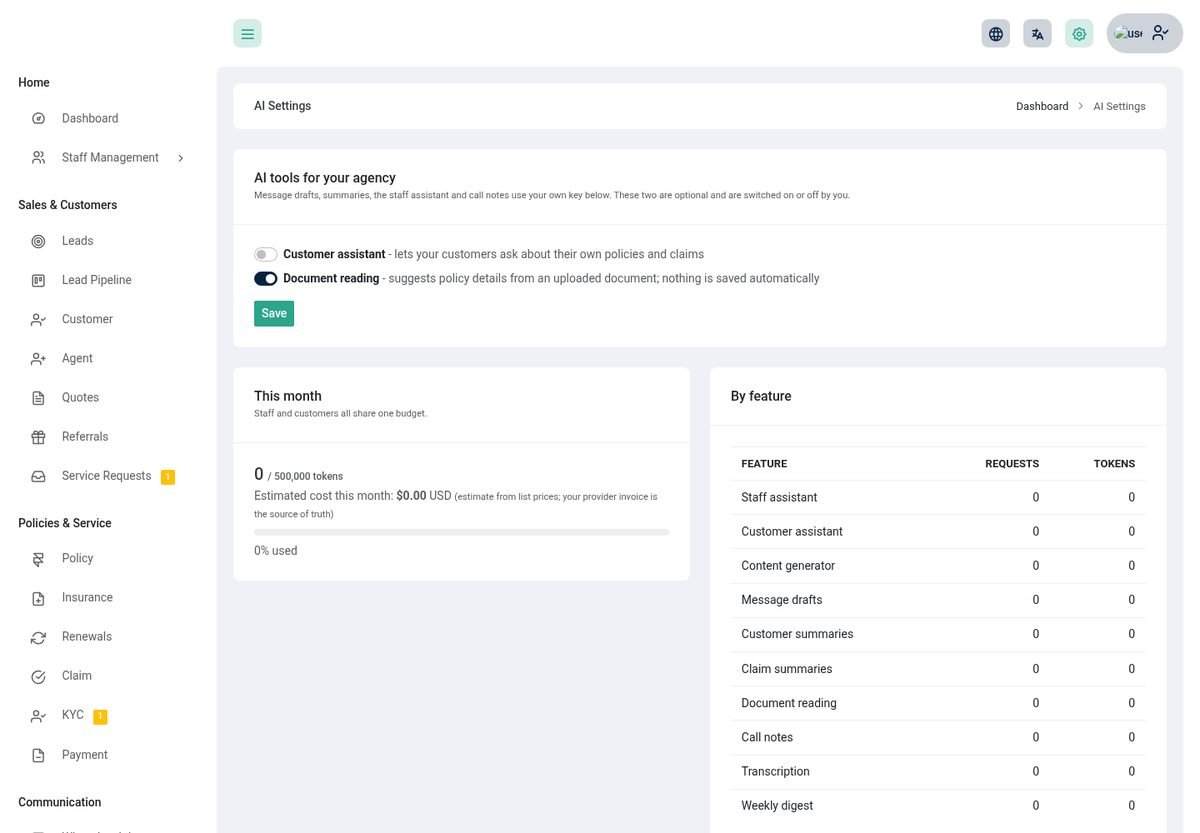
- Each owner opens AI Settings, picks a provider (OpenAI or Anthropic), adds their own key and an optional model.
- The owner switches the customer assistant and document reading on or off.
Keys and limits
- Keys are stored encrypted, checked when saved and never shown again.
- Set a monthly token budget (0 is unlimited). When it is used up AI is paused until next month. Staff and customers share one budget. The page shows requests, tokens, an estimated cost and who used it, by feature.
- The super admin sees every agency's usage under AI Usage and can set an agency's monthly allowance.
- Optional list prices for the cost estimate:
AI_PRICE_OPENAI_INPUT,AI_PRICE_OPENAI_OUTPUT,AI_PRICE_ANTHROPIC_INPUT,AI_PRICE_ANTHROPIC_OUTPUT.
Messages & automation
Let Policy Hub send the routine messages and connect to the rest of your tools.
Email notifications and reminders
- System Configuration → Email Notification holds the renewal reminder template. Use placeholders such as the customer's name, policy number, due date and
{payment_link}. - Choose the channels (email, SMS through Twilio, WhatsApp) and when to send, before or after the due date. The daily cron job sends them.
- A
{payment_link}in a reminder is replaced with a pay-now link when online payment is set up and something is due.
N8N and webhooks
Under N8N add webhook addresses for events in your agency. Policy Hub posts a small JSON message to each when something happens, so you can drive Zapier, n8n or your own system.
| Event | When |
|---|---|
lead_created | A new lead arrives (any source). |
lead_won | A lead is marked won. |
policy_renewed | A policy is renewed. |
policy_cancelled | A policy is cancelled. |
claim_status_changed | A claim moves to a new status. |
payment_received | A payment is settled. |
Notice Board and Contact Diary
The Notice Board posts announcements to your team. The Contact Diary keeps a personal list of useful contacts for whoever has the permission.
Roles & permissions
Every page and every action is protected by a permission. Give people exactly what they need.
- Under Staff Management → Roles create a role and tick the permissions. They are grouped by area (customers, policies, claims, leads, renewals, quotes, tasks, analytics, KYC, website, service requests and more). Then create a user with that role.
- Each agency starts with ready-made Owner, Agent and Customer roles. Changing what an agent may do is a matter of editing the Agent role.
- A menu entry appears only when you have its permission, and a page you cannot use answers Permission denied even if you type its address.
- Regardless of permissions, an agent only ever sees their own customers, policies, leads, claims, renewals and quotes, and a customer only their own.
php artisan migrate. Custom roles keep exactly what you gave them, so tick the new permissions there yourself. If a permission seems missing, run php artisan permission:cache-reset.Settings & integrations
Everything under System Settings → Settings. Owners set up their own agency; the super admin sets the platform.
| Tab | What you set |
|---|---|
| Account | Your name, email, phone and picture. |
| Password | Change your password. |
| General | Logo, currency, date and time formats, number prefixes, and the behaviour switches: claim SLA days, KYC required, automatic lead assignment. |
| Company | Name, address, phone, email and registration details shown on documents and your website. |
| Email (SMTP) | Your mail server and the test email. Used for every message to your customers. |
| Payment | Stripe, Razorpay, PayPal, Flutterwave, Paystack and bank transfer details. |
| SEO | Title, description and keywords for the platform pages (super admin). |
| reCAPTCHA | Google reCAPTCHA on the login and sign-up forms. |
| Two-factor (2FA) | Authenticator-app sign-in for your account. |
| Storage | Where uploads go: local disk, Amazon S3 or Wasabi, with the allowed file types (super admin). |
| Twilio | SMS and WhatsApp: account, token and number. |
| AI | Opens AI Settings. |
| Cronjob | The key for the web cron. |
Languages & themes
Policy Hub speaks your customers' language and looks the way you like.
- Languages: English, Arabic, Danish, Dutch, French, German, Italian, Japanese, Polish, Portuguese, Russian and Spanish. Every user picks theirs from the language button in the top bar. Customers' choice also applies in the app.
- Themes: light and dark mode, brand colours and layout options under Settings.
- Language files are in
resources/lang. Add or correct a translation in the JSON file for that language.
API
Two REST APIs, both limited to what the signed-in person may see.
Agency API (v1)
For your own tools. Get a token with your email and password (accounts using two-factor sign-in cannot request one this way), then send it as a bearer token. 60 requests a minute.
POST /api/v1/token     {email, password, device_name}   -> {token}
GET  /api/v1/policies | /policies/{id} | /claims | /claims/{id} | /leads | /customers | /customers/{id}
POST /api/v1/leads     (409 with the matches when it is a duplicate; send ignore_duplicates=true to force)
Authorization: Bearer YOUR_TOKEN
A customer sees only their own records, an agent only their own, and the owner the whole agency.
Customer app API
Powers the Android and iPhone apps at /api/mobile/v1. It covers company lookup, sign-in (password, emailed code, two-factor), the dashboard, policies, certificates, payments, receipts, pay links, claims with document upload, requests, KYC, profile, referral, plans, notifications, the assistant and push device registration. Customers only, and only their own records. Every call, status code and rule is described in MOBILE_API.md in the application folder and docs/mobile-api.md in each app.
SaaS administration
Run Policy Hub as a service: agencies sign up, choose a plan and pay.
- Agencies: each owner is an agency. See their plan, expiry date and status; make one inactive to block their login.
- Packages: Pricing → Packages. Set the price, interval (monthly, quarterly, yearly or unlimited), limits on users, customers and agents, and the optional features (logged history, N8N, AI tools).
- Transactions and coupons: see every plan purchase and create discount coupons.
- Platform settings: storage, SEO, reCAPTCHA, the payment gateways agencies use to buy plans, the landing page, pages, FAQ and footer (CMS), and the app store links.
- Switch pricing off to run Policy Hub for a single agency with no plan limits.
Upgrading
Always back up first.
What to back up
- The database (export it from phpMyAdmin).
- The
.envfile, the.htaccessfile and thestoragefolder. - Any language files you edited under
resources/lang. They are overwritten.
Steps
- Put the site in maintenanceif you can:
php artisan down. - Replace the filesUpload the contents of the new
main_fileover your web root. - Restore
.env,.htaccessandstorage. - Update the database and permissionsRun
php artisan migrate --forceand thenphp artisan permission:cache-reset. Without a terminal, use the update wizard when you log in. - Clear caches
php artisan optimize:clear. - Bring it back
php artisan up, then check the dashboard, a policy, a claim and a payment.
Going live checklist
- HTTPS is on and
APP_URLuses it. APP_ENV=productionandAPP_DEBUG=falsein.env.- Every default password is changed, and two-factor is on for the owner and super admin.
- SMTP works (the test email arrives) and the company details and logo are filled in.
- The cron line runs every minute (Background work).
- Only the
publicfolder is reachable from the web, and.envandstorageare not downloadable. - Folders other than
storageandbootstrap/cacheare not writable by the web server. - Online payments are tested with a small real payment, and a receipt downloads.
- A database backup runs on a schedule and you have tried restoring one.
- For the apps:
FCM_CREDENTIALSis set and a test push arrives on a real phone. - The documentation and
mobile_appfolders are not on the web server.
Troubleshooting & FAQ
Check storage/logs/laravel.log first; it almost always says what went wrong.
Common questions
| Problem | Try this |
|---|---|
| A blank page or error 500 after installing | Make storage and bootstrap/cache writable, then php artisan optimize:clear. Check the log. |
| Reminders, overdue flags or app reminders never arrive | The cron line is missing or the path is wrong. Run php artisan schedule:list and php artisan app:mobile-reminders by hand. |
| No emails are sent | Check Settings → Email (SMTP) and send the test email. A sign-up that needs confirmation is cancelled if the email cannot be sent. |
| A menu item or page is missing for a user | The role lacks the permission. Tick it under Roles. After an upgrade run php artisan permission:cache-reset. |
| An agent cannot see a customer | Agents see only customers assigned to them or holding one of their policies. Assign the customer to the agent. |
| The Pay button or payment link does not appear | Stripe or Razorpay is not switched on with working keys under Settings → Payment. |
| A policy cannot be issued | KYC is required and the customer is not verified yet. Approve it under KYC. |
| A claim cannot be approved | A required document is missing. The claim page lists which. |
| AI menus are missing or say unavailable | The plan does not include AI, the owner has not added a key, or the monthly budget is used up. See AI Settings. |
| The website shows a 404 | It is switched off, or the page is still a draft. Turn on Website is live and publish the page. Reserved names such as login cannot be page addresses. |
| My own domain shows the platform instead | Its DNS must point at this server and the same address must be saved under Publishing. |
| The app cannot find the agency | The website must be live. If you hid the agency from search, use the code or QR. Check the server address the app was built with. |
| No phone notifications | Push is optional: set FCM_CREDENTIALS and make sure cron runs. The in-app inbox works without it. |
| WhatsApp messages do not arrive | The Twilio webhook address must be set exactly as shown, and the agency's Twilio token saved. |
| Upload fails | Check the allowed file types and size under Settings → Storage and your PHP upload_max_filesize. |
Environment variables
Set in the .env file in the application folder. Most are filled in by the installer.
| Variable | Default | Meaning |
|---|---|---|
APP_URL | - | The address of the site, with https. |
APP_ENV, APP_DEBUG | production, false | Never leave debug on in production. |
DB_HOST, DB_DATABASE, DB_USERNAME, DB_PASSWORD | - | The database. |
MAIL_* | - | Platform mail server (agencies can set their own in Settings). |
QUEUE_CONNECTION | sync | Leave as sync unless you run a queue worker. |
FILESYSTEM_DISK | local | Uploads can also go to S3 or Wasabi from Settings. |
SESSION_LIFETIME | 120 | Minutes before an idle web session ends. |
TIMEZONE | - | The platform time zone. |
FCM_CREDENTIALS | - | Firebase key for push. |
MOBILE_MIN_APP_VERSION, MOBILE_MAINTENANCE, MOBILE_REMINDER_DAYS, MOBILE_TOKEN_IDLE_DAYS | 1.0.0, false, 2, 90 | See Mobile apps. |
AI_PRICE_* | - | Optional list prices for AI cost estimates. |
OTP_* | - | Two-factor sign-in timing. |
Change log
Version 2.0
- Customer mobile apps for Android and iPhone, with company code, search, QR, push and an inbox; the customer API; a Get our app page; and a Mobile Apps page for owners and the platform.
- Agency website with a block-based page builder, plan pages, quote and enquiry forms, online sign-up, your own domain and a My website shortcut.
- Customer portal: My Requests, notifications bell, policy certificates, claim progress and document upload, and data download or deletion request.
- New dashboards for the owner, agent, customer and super admin, with a daily briefing, an AI summary and an assistant box.
- Agent login: leads, a performance page, reports on their own book, and stricter limits to their own records.
- Claims: workflow with SLA, document checklist, history and triage. Renewals board with lapse risk. Instalments, payment links (Stripe and Razorpay), PDF receipts and certificates.
- Leads and quotes: pipeline, scoring, duplicate check, auto-assign, quotes with PDF and a public accept link. KYC, referrals, commission rules and statements.
- Reports: renewals, outstanding dues, lead funnel, agent performance and customers, all with CSV; analytics with PDF; import and export; audit log.
- AI tools with each agency's own key, plan control, budgets and usage.
- WhatsApp inbox, tasks and calendar, a regrouped menu and one password rule everywhere.
- Security: policies, claims, customers, leads, renewals, quotes, documents and payments are now limited to the agency and, for agents and customers, to their own records; only the owner decides commission and payment acceptance.
Support
Stuck? We are happy to help.
Open a ticket at support.smartwebinfotech.com. Please include your purchase code, the page you were on, what you expected, and the last lines of storage/logs/laravel.log.